
Instagram Lead Generation for Small Business
How small businesses turn targeted Instagram engagement into inbound leads with Gramlens Actions — and why Pro at $11.99/mo pays for itself with one client.
Most small businesses have the same problem on Instagram: the product's good, the service is good, the photos are fine — and almost nobody sees the profile. Instagram lead generation for small business usually comes down to one unglamorous activity: engaging the right people, one at a time, until enough of them notice you back. Follow a relevant account, like a couple of posts, leave a real comment. It works — but it's a grind, an hour of tapping you do instead of running your actual business.
This post is about automating that grind honestly. Gramlens Actions runs that follow-like-comment outreach for you, at a safe human pace, against an audience you've deliberately chosen. It won't manufacture demand or hand you a list of emails — what it does is take the manual labor out of outreach you'd be doing anyway. Which is exactly why, for most service and B2B businesses, the $11.99/mo Pro plan pays for itself the first time a lead becomes a paying customer.
How Instagram lead generation for small business actually works
Here's the honest mechanism.
Actions automates engagement — follow, like, and comment. It does not scrape emails, phone numbers, or contact data (that's a separate feature, Deep Parse, with its own email-extraction guide — not what this play is about). So "lead generation" here isn't about harvesting a contact list. It's warm, inbound outreach:
- You pick a relevant audience — the followers of a competing business in your city, or a niche audience you've already parsed.
- You engage them at a safe pace: follow them, like a recent post, leave a genuine comment.
- A fraction notice you — some visit your profile, some follow back, a few send a DM or book something.
That's the whole funnel: targeted engagement → profile visits → follow-backs & DMs → leads.
The important word is fraction. This is a top-of-funnel awareness tactic, not a conversion machine — you put your name in front of people who have a real reason to care and let curiosity do the rest. Many will ignore you; the ones who don't are relevant, and at the scale automation makes possible, even a small response rate turns into real conversations. Results vary by niche, offer, and profile. Nobody can promise you "X leads" — anyone who does is lying.
Step one: find the right people to engage
The campaign is only as good as the audience, so this is where the work is. Actions never collects accounts live — it works off a list you've already exported. So you parse first, filter second, then automate.
Parsing is where you decide who. The mechanics are in how to export Instagram followers to CSV, but the short version: open a relevant profile and grab its followers (or following). The classic small-business move is to parse a direct competitor's followers — people in your city or niche who've already shown they want exactly what you sell, a far more qualified audience than a random hashtag crowd. Sharpen it by subtracting the people who already follow you: comparing the two accounts leaves only the part of their audience that has never encountered you, which is the half worth spending actions on.
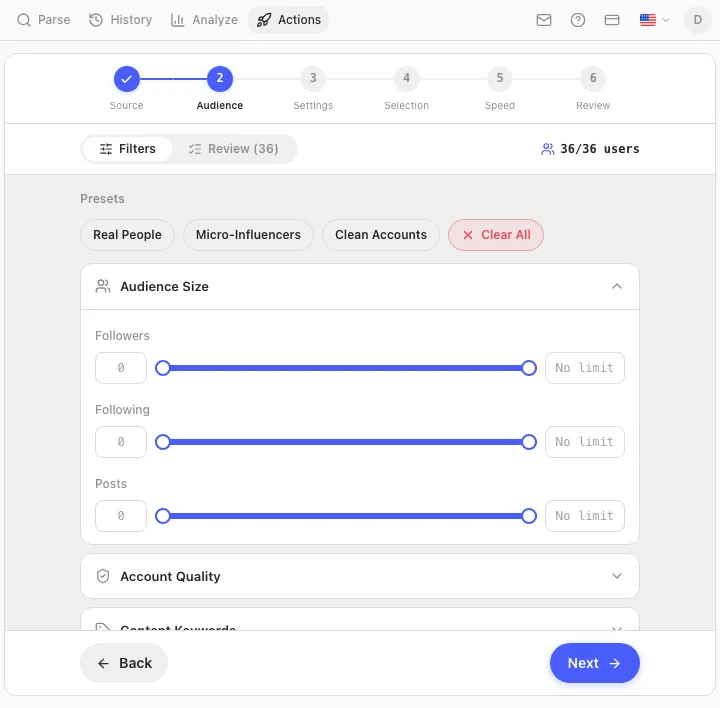
Then you narrow it. In the Actions wizard's Audience step you filter the parsed list down to who you actually want:
- Audience-size filters (follower / following / post counts) are available on every plan. Good for skimming off obvious bots and dormant accounts.
- Account-Quality filters (follow ratio, business accounts, verified, has a bio or avatar) and bio-keyword filters (include or exclude profiles whose bio contains certain words) are Pro — the ones that let a B2B freelancer isolate "business accounts only," and a big part of why the lead play is a Pro play.
Filter tightly. A smaller, sharper list beats a huge sloppy one every time — both for results and for staying under Instagram's radar.
Step two: run the campaign with Actions
Once you have a filtered audience, you point Actions at it. The full step-by-step setup — every screen of the wizard, the safety controls, what runs while it works — is in the Actions how-to guide. This article is the why; that one is the how.
The short shape: pick your source list, set filters, choose a combined follow → like → comment campaign (they run in that order), write a few genuine comment templates, pick a pace, and start. It then runs in the background, inside your Instagram tab, one account at a time, jittering its timing to behave like a person rather than a script — a big run is a multi-hour, sometimes multi-session job by design.
The follow-like-comment combo is the strongest version because it's the most human. A follow alone is easy to miss; a follow plus a like plus a relevant comment is a real touch — the kind of thing that makes someone tap your profile. Comment is a Pro action, and it's the single biggest lever in this workflow.
The $11.99 math: one client pays for months of Pro
Now the money — because this is where Pro stops being an expense and starts being arithmetic.
Pro is $11.99/mo. Think about what one new customer is worth to you: a barber retains a regular for years, a trainer's client is worth hundreds over a few months, a web designer's project a few thousand, a bookkeeper bills monthly and indefinitely. For most service and B2B small businesses, a single client is worth many multiples of $11.99 — so one lead that closes covers months, often a full year, of Pro.
That's a value frame, not a promise. Pro doesn't produce leads — it produces reach, by automating outreach you'd otherwise do by hand. But the math is forgiving precisely because the cost is so low against the value of one customer; you don't need a high hit rate for it to make sense.
Compare it to the alternatives honestly:
- Doing it by hand. Following, liking, and commenting on hundreds of targeted accounts is hours of repetitive tapping. Your time isn't free — even valued modestly, a few hours a week dwarfs $11.99/mo.
- Hiring it out. Agencies and "growth services" charge far more than $11.99 for managed engagement, and you're trusting a stranger with your account and your judgment about who to target. With Actions you keep both.
Pro is the tier for this for a concrete reason: Comment, the faster speed modes, and the advanced account-quality and keyword filters are all Pro — exactly what the lead play depends on. Free and Plus run follow-and-like on Safe mode to get a feel for it; the real workflow lives in Pro.
Three small businesses, three plays
Here's what this looks like for three kinds of small business.
A local barbershop (or studio, café, personal trainer). Target: the followers of two or three competing shops in the same city — people who've already shown they get haircuts in your area, about as qualified as a local lead gets. The campaign follows them, likes a recent post, and leaves a real comment. A lead is a follow-back that becomes a DM about availability, or a walk-in who saw your name — and Actions handles what the owner would otherwise do at 11pm on the couch.
A freelance web designer (or bookkeeper, B2B service). Target: the audience of an adjacent business they could serve — the followers of a local business-coaching account, filtered with the Pro business-account and bio-keyword filters down to actual small-business owners. A lead is a profile visit that becomes a "saw your work — do you take new projects?" DM. The account-quality and keyword filters are what make this targeting possible, and they're Pro.
A small e-commerce or creator brand. Target: an interest-based audience — followers of complementary (non-competing) brands or creators in the niche. A handmade-candle shop engages a popular home-decor account's followers; the lead is a profile visit that ends in a follow and, eventually, a sale. At this scale automation matters most — reaching enough of an interest audience by hand simply isn't feasible.
In all three, the pattern is identical: a clearly relevant audience, engaged genuinely, at a pace that protects the account — and the owner's evenings back.
Doing it right (and the honest caveats)
This tactic works because it's genuine and targeted. It stops working — and starts hurting you — the moment it becomes spam. A few rules:
- Make the engagement real. Vague, identical comments ("Nice! 🔥") on hundreds of profiles read as spam to humans and trip Instagram's spam detection. Write several varied, on-topic templates that actually relate to what the account posts. Target tightly; don't blast.
- Automated actions are against Instagram's Terms of Service. That's a plain fact, not a scare tactic. Gramlens lowers the mechanical risk by pacing itself and hard-stopping when Instagram pushes back, but it can't change the ToS — you do this at your own discretion.
- Safe pacing is the point, not a limitation. This is a slow, multi-hour background tactic by design — Safe mode runs roughly 150 actions a day. Rushing it with the faster modes on a fresh account is how you earn an action block. When Instagram throws a challenge, the engine stops itself — your signal to back off and let things cool down.
- Set the right expectation. Actions removes the manual labor of outreach; it doesn't manufacture demand. If your profile, offer, or photos aren't compelling, more reach won't fix that — it'll just expose it faster. Get the profile right first.
One more accuracy note: Comment, the faster modes, and the advanced filters are Pro. Free and Plus do follow + like on Safe mode only — fine for testing the waters, not the full lead workflow.
FAQ
Is this safe for my account?
Safer than doing it fast by hand, but nothing on Instagram is risk-free. Actions paces every action, randomizes timing, takes breaks, and stops immediately when Instagram pushes back. The biggest thing you control is staying on Safe mode and not rushing — and newer accounts should go slower.
Will it get me banned?
Used carefully — Safe mode, reasonable volumes, genuine comments, an account that isn't brand new — the mechanical risk is low, and the hard-stop protects you from blowing past a warning. But automation is against Instagram's Terms of Service, so the honest answer is there's always some risk, and it's yours to weigh.
How many leads will I get?
There's no honest number to give you. It depends on your niche, your offer, how good your profile is, and how well you targeted. This is a top-of-funnel awareness tactic — it puts you in front of relevant people, it doesn't guarantee conversions. Anyone quoting a guaranteed lead count is making it up.
Do I need Pro for this?
For the real workflow, yes. Comment, the faster speed modes, and the advanced account-quality and bio-keyword filters are all Pro ($11.99/mo). Free and Plus run follow + like on Safe mode with basic size filters — enough to try the mechanic, not the full play. Plus lifts Gramlens's data limits but adds no extra Actions power.
How is this different from buying followers?
Completely. Bought followers are fake or bot accounts that inflate a number and do nothing — they never buy, never DM, and can hurt your reach. This targets real, relevant people who have a genuine reason to care, and engages them authentically. The goal isn't a bigger follower count; it's conversations with potential customers.
How long until I see results?
Plan in weeks, not minutes. Safe mode runs in the low hundreds of actions per day, so reaching a meaningful audience is a multi-day effort — and follow-backs and DMs trickle in as people notice you. It's a steady drip, not a switch you flip.
TL;DR. Instagram lead generation for small business comes down to engaging the right people until enough notice you back. Gramlens Actions automates that grind: parse a relevant audience (e.g. a local competitor's followers), filter it down (account-quality and keyword filters are Pro), then run a safe-paced follow → like → comment campaign in the background. It's warm, inbound outreach — not email scraping, and not a guaranteed-leads machine. Comment, the faster modes, and the advanced filters are Pro ($11.99/mo); Free and Plus get follow + like on Safe mode only. Keep comments genuine, respect that automation is against Instagram's ToS, and remember the math: for most small businesses, one new client pays for a year of Pro.
Explore the feature