
How to Clean Up a Bot Follower Attack on Instagram (Step-by-Step)
Hit by a bot follow attack? How to remove bot followers on Instagram in bulk with Gramlens — rate-limit-aware, one background job, in an evening not a week.
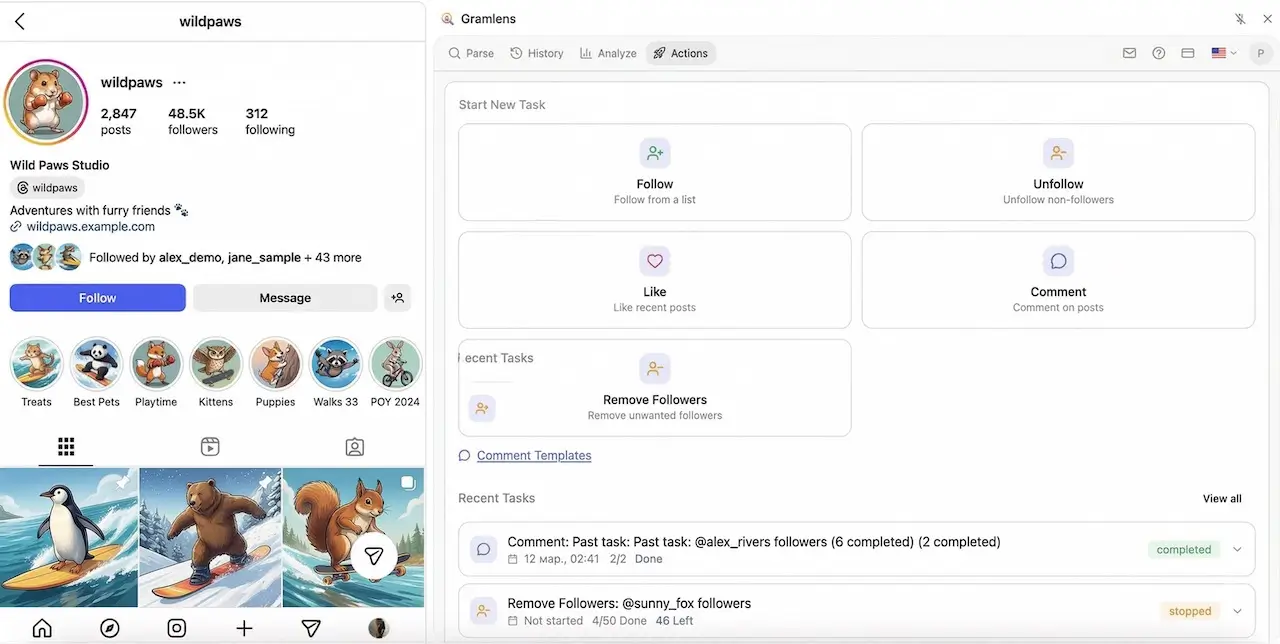
One morning your follower count jumps by 3,000 and your engagement rate quietly craters. You didn't go viral — you got hit by a bot follow attack: a wave of fake accounts, sometimes thousands at once, force-followed onto your profile by someone with a grudge, a botnet, or a "growth" service gone wrong. This guide is an honest, step-by-step walkthrough of how to remove bot followers on Instagram in bulk with Gramlens — turning hours of manual "remove follower" tapping into a single, rate-limit-aware background job.
A bot follower attack isn't just cosmetic. The damage is real and measurable:
- Engagement rate collapses. Your ratio of likes and comments to followers is a number brands, the algorithm, and your own analytics all watch. Dump 3,000 accounts that will never like a post into the denominator and your engagement rate halves overnight.
- You look spammy. A profile with 8,000 followers and 40 likes per post reads as bought, even when you did nothing wrong. Sponsors and collaborators notice.
- You can trip Instagram's spam systems. A sudden, unnatural follower spike is exactly the pattern Instagram's integrity systems flag. In the worst case the platform's own cleanup sweeps catch your account in the blast radius.
The native fix — open each fake follower, tap the three dots, tap "Remove" — is miserable at scale. Nobody is doing that 3,000 times. Here's the workflow that actually works.
First move: go private to stop the wave
Before you remove a single account, stop the bleeding. Temporarily set the account to private (Instagram → Settings → Account privacy → Private). This is the step most guides skip, and it's the one that actually halts an in-progress attack.
Here's why it matters, and it's the single most important thing to understand on this page: removing a follower does not block them. Instagram's "Remove" simply kicks an account out of your followers list. On a public account, a removed bot can turn right around and follow you again — and if the attack is still running, it will. You'll be bailing water out of a boat with the hole still open.
Going private closes the hole. While the account is private, new follow attempts become pending requests you have to approve, so the bot wave can't auto-add itself anymore. You clean up behind a locked door, then flip back to public when the dust settles. (If one specific bot keeps coming back even after you go public, the permanent stop is Instagram's native Block — see the caveats section, because this is something Gramlens deliberately does not do for you.)
How to remove bot followers on Instagram: two clean-up workflows
Which workflow you use depends on one thing: whether you have an older snapshot of your followers from before the attack. Most people don't — that's Workflow A. If you do, Workflow B is surgical.
Both run through the Actions tab in Gramlens, and both use the Remove Followers action, which lives under the Manage group ("your own connections"). Remove Followers is a Pro action — more on the tiering at the end.
Workflow A — No baseline snapshot (the common, reactive case)
This is where almost everyone starts: the attack already happened, you have nothing to compare against, so you work from the only signal you have — the bots are almost always your newest followers.
- Parse your own account's followers. Open your profile, open Gramlens, and export your follower list — the same basic parse covered in how to export Instagram followers to CSV. This gives you the raw list to work from.
- Isolate the most recent followers. Instagram returns followers newest-first, and Gramlens preserves that order. There's no "sort by date" toggle in the followers table — instead, you control the slice in the Actions wizard's Selection step: set "First N" to 500 or 1,000, and leave the order on "As listed" (Instagram's native newest-first order). That targets the freshest entries — i.e. the wave — without touching your long-standing followers.
- Eyeball-confirm they're bots before you remove. This is not optional. Scroll the list and sanity-check the tell-tale signs of a fake account: no profile photo, zero or single-digit posts, junk usernames (random letters and numbers,
user8842013), and a lopsided ratio (following thousands, followed by nobody). Real followers don't look like that. If your "recent followers" are a clean mix of real people, the attack may be smaller than you think — narrow the count. - Run the batch Remove Followers job. Once you're confident the slice is genuinely fake, start the job on Safe speed. Gramlens works through the list at a deliberate, rate-limit-aware pace.
The honest tradeoff with Workflow A: it's pattern-matching, not certainty. You're betting that "newest 500" ≈ "the bot wave." That's usually true right after an attack, but it's why step 3 exists.
Workflow B — You kept a baseline snapshot (the precise method)
If you parsed your account at any point before the attack, you can skip the guesswork entirely.
- Open the Analyze tab and go to Timeline. Timeline loads every follower snapshot Gramlens has saved for the account and lets you pick two by date.
- Choose a pre-attack snapshot as the baseline and the current state as the comparison. Gramlens diffs them and labels every account "New" or "Unfollowed."
- The "New" set is exactly the followers added since your baseline — which, right after an attack, is the bot wave, with no eyeballing required.
- Remove only that diff.
This is the difference between "remove my newest 1,000 and hope" and "remove precisely the 2,840 accounts that appeared in the last 48 hours." The catch is that Timeline needs at least two snapshots to compare — so if this attack caught you without one, the takeaway for next time is simple: parse your own followers on a schedule (monthly is plenty). A standing baseline turns the next attack from a panicked guess into a two-click cleanup.
Let it run in the background
Removal is intentionally slow. That's a feature, not a bug — Instagram rate-limits how fast you can remove followers, and a tool that ripped through 3,000 removals in ten minutes would get your account action-blocked. Gramlens paces every removal, adds randomized delays, and takes natural breaks, so a large wave is realistically a multi-hour job (a genuinely huge one can span more than a session).
You are not meant to sit and watch it. The Gramlens action queue runs inside the Instagram tab itself, not in the sidepanel UI — so you can close the sidepanel, switch windows, and let it cook, then reopen later to a live progress bar. The cleanest way to do this is the dedicated-window setup described in the best way to use Gramlens: pull Instagram into its own Chrome window, dock the sidepanel, start the job, and go back to your real work. Just don't close or navigate away from the Instagram tab — that's the engine, and closing it stops the run.
What you can't (and shouldn't) do
Straight talk, because the cost of getting this wrong is your account:
- You can't remove thousands instantly. Instagram rate-limits removals; pushing too fast risks a temporary action block. Gramlens paces the job for you — do not crank the speed up during a cleanup. Safe mode exists for exactly this moment.
- Removing is not blocking. Gramlens can Remove Followers and Unfollow — it does not block accounts. A removed bot can re-follow a public profile. Going private during the cleanup is what stops re-follows; for a single persistent harasser, use Instagram's native Block manually.
- Watch for false positives. The expensive mistake here isn't leaving a few bots behind — it's nuking real followers. Removing a genuine fan is far costlier than tolerating some leftover fakes. Go slow, and review before you remove. Workflow B exists precisely to eliminate this risk.
- Automated actions are against Instagram's Terms of Service. That's a plain fact, not a scare tactic — bulk follower management with any tool is something you do at your own discretion. Gramlens reduces the mechanical risk by pacing and stopping on warning signals (it hard-stops the moment Instagram throws a checkpoint or "action blocked" response), but it can't change the ToS. Decide accordingly.
FAQ
Does removing a follower notify them?
No. Instagram does not send any notification when you remove a follower. The account simply stops following you and won't know unless they go looking.
Can the bot re-follow after I remove it?
Yes — if your account is public. Removing is not blocking, so a still-active bot can follow you again immediately. This is the whole reason for going private during the cleanup, and for using Instagram's native Block on any specific account that won't quit.
How fast is it safe to remove followers?
Slow. Stay on Safe speed; Gramlens spaces removals out and inserts automatic pauses to stay under Instagram's radar (Safe is built around the low-hundreds-per-day range, not thousands per hour). For a big wave, accept that it's a background job measured in hours, not minutes.
Will this hurt my real followers?
Only if you remove the wrong people. That's why both workflows build in a review step — eyeballing the newest slice (Workflow A) or diffing against a clean baseline (Workflow B). Confirm before you run, and a false positive is rare.
Can I do this on the Free plan?
No. Bulk Remove Followers (and Unfollow) are Manage actions on the Pro plan. The Free plan covers parsing/exports up to its limits plus follow and like in Safe mode; Plus lifts the parsing and Deep Parse limits but does not unlock the Manage actions. Cleaning up an attack at scale is a Pro workflow.
What if the attack is 10,000+ accounts?
Same method, longer runtime. Plan for a multi-session, multi-hour job on Safe speed, keep the account private until it's done, and consider splitting the cleanup across a couple of days rather than forcing it all through at once. Workflow B is strongly preferable at this scale — diffing a baseline beats reviewing ten thousand profiles by hand.
TL;DR. Go private to stop the wave (remember: removing isn't blocking). Then pick a workflow — if you have no old snapshot, parse your own followers and use the Actions wizard's "First N" + "As listed" to target your newest 500–1,000, eyeball-confirm they're bots, and run Remove Followers on Safe. If you kept a pre-attack snapshot, open Analyze → Timeline, diff it against now, and remove exactly the "New" accounts. Either way, queue it on Pro, let it run in the background, don't rush the speed, and review before you remove.