
Instagram'da Güvenli Toplu Takipten Çıkma (Engellenmeden)
Elle takipten çıkma, Instagram direnmeye başlamadan önce saatte yaklaşık 10 hesapta tıkanır. İşte gerçek takipten çıkma limitleri, elle yöntemin nerede kırıldığı ve otomatik tempo ayarıyla nasıl güvenle toplu takipten çıkılacağı.
Er ya da geç neredeyse her Instagram hesabı, olması gerekenden çok daha fazla kişiyi takip eder hale gelir: "takibe takip" döneminden kalanlar, aktif olmayan hesaplar, 2021'de bir kez alışveriş yaptığınız dükkanlar. Belki de az önce kimin sizi takipten çıktığını kontrol ettiniz ve takip listenizin yarısının hiç geri takip etmediğini keşfettiniz. Şimdi yüzlerce hesabı takipten çıkmak istiyorsunuz — ve muhtemelen tam da bunu yapmanın action block yemenin en hızlı yollarından biri olduğunu duymuşsunuzdur.
Bu ün hak edilmiş, ama sorun takipten çıkmanın kendisinde değil. Sorun bunu ne kadar hızlı yaptıklarında. Bu rehber, aslında neyin engellemeleri tetiklediğini, gerçek takipten çıkma limitlerini, elle yönteme dürüst bir bakışı (küçük temizlikler için gerçekten gayet iyidir) ve bir toplu takipten çıkmayı Gramlens ile ölçülü bir arka plan kampanyası olarak çalıştırmanın adım adım anlatımını kapsıyor — böylece temizlik tek bir fark edilir patlamada değil, günlere yayılarak gerçekleşir.
Toplu takipten çıkma hesapları neden engelletir
Instagram takipten çıkmaları zararsız bir ev işi olarak görmez. Bir takipten çıkma bir eylemdir, tıpkı bir follow, bir like ya da bir comment gibi aynı kategoridedir — ve Instagram'ın anti-spam sistemleri eylemlerinizin yönüne değil, hızına ve ritmine bakar.
Hesapları iki kalıp işaretletir:
- Hız (velocity). Bir kişi birkaç hesabı takipten çıkar, kaydırır, dikkati dağılır, geri döner. Bir temizlik çılgınlığı buna hiç benzemez: iki saniyede bir takipten çıkma, kusursuz eşit aralıklarla, kırk dakika boyunca aralıksız. O zamanlama imzasını yakalamak son derece kolaydır — ister çılgınca dokunuşlardan gelsin ister bir tarayıcı script'inden.
- Follow/unfollow döngüleri. Hesapları takip edip kısa süre sonra takipten çıkmak — karşılıklılığı kandırmak için tekrar tekrar — platformdaki en çok gözlenen büyüme hilesidir. Yakın zamanda follow kampanyaları çalıştırdıysanız masum bir temizlik bile buna benzeyebilir. Instagram takip limitleri rehberi, Instagram'ın bu kalıbı nasıl fark ettiğini ve engellemelerin nasıl göründüğünü ayrıntılarıyla anlatıyor.
İlk action block genellikle geçicidir — bir iki gün takip etme/takipten çıkma yeteneğinizi kaybedersiniz. Bir ay içinde tekrarlarsanız süreler uzar ve her engelleme, algoritmanın hesabınıza ne kadar güvendiğine bir iz bırakır.
Instagram'ın gerçek takipten çıkma limitleri
Instagram hiçbir zaman bir takipten çıkma limiti yayımlamadı. Topluluğun tutarlı biçimde gözlemlediği şey, takipten çıkmaların yaptığınız her şeyle aynı günlük eylem bütçesinden çekildiği — olgun, "ısınmış" bir hesap için günde toplam kabaca 1.000 eylem, follow, unfollow, like ve comment arasında paylaşılan ve yeni hesaplar için çok daha az. Hesap yaşına göre tam döküm, engellemelerin ne kadar sürdüğü dahil, Instagram takip limitleri rehberimizde var — burada onu tekrarlamayacağız.
Özellikle takipten çıkma için pratik güvenli bölge şöyle görünür:
| Tempo | Saatte | Günde | Şunun için makul |
|---|---|---|---|
| Temkinli | ~10 | ~30 | Her hesap, yakın zamanda engellenenler dahil |
| Ölçülü | ~15 | ~100 | İyi durumda, yerleşik hesaplar |
| Üst sınır | ~20 | ~150 | Yakın otomasyon geçmişi olmayan yaşlı hesaplar |
Bu sayılar bilerek muhafazakârdır — Gramlens'in kendisinin Güvenli, Optimal ve Hızlı modlarında zorladığı tavanlardır ve insanların engellenme bildirdiği eşiklerin belirgin biçimde altında kalacak şekilde ayarlanmışlardır. "Sonra tekrar deneyin" mesajını bir kez bile görürseniz, 24–48 saat durun. Bir uyarıyı zorlayarak geçmek, geçici engellemelerin nasıl haftalık olanlara dönüştüğüdür.
Bilmeye değer bir sayı daha: Instagram herkesi toplam 7.500 takip edilen hesapla sınırlar. Takip listeniz buna yakın bir yerdeyse, periyodik bir temizlik kibir değil — yeni birini takip edebilmenin tek yoludur.
Elle yöntem ve nerede kırıldığı
Önce dürüstlük: ~50 hesaptan az takipten çıkmanız gerekiyorsa, bunu elle yapın. Profilinizi açın → Takip edilenler, her hesabın yanındaki Takip ediliyor düğmesine dokunun, onaylayın. Bir iki güne yayın — dünyadaki hiçbir araç bunu anlamlı biçimde daha iyi yapamaz.
Elle yöntem ölçekte kırılır, ve sadece limitler yüzünden değil:
- Matematik acımasız. Güvenli ~10 takipten çıkma/saat hızında, 1.500 geri takip etmeyeni temizlemek 150 saatlik aktif ekran zamanıdır, haftalara yayılmış. Kimse aslında bunu yapmaz; hızlanırlar — ve engelleme tam da o zaman gelir.
- Liste elinizin altında kayar. Instagram'ın takip listesi oturumlar arasında yeniden sıralanır, bu yüzden nerede durduğunuzu kaybedersiniz. Zaten karar verdiğiniz hesapları yeniden kontrol eder durursunuz.
- Yanlış dokunma hataları. Akşamın 80. takipten çıkması civarında bir yerde bir müşteriyi, bir arkadaşı ya da gerçekten okuduğunuz bir hesabı takipten çıkarsınız. Geri alma geçmişi yoktur — kimi kaybettiğinizi bile bilmezsiniz.
- Hiç kayıt yok. İşiniz bittiğinde, neyi kaldırdığınızın bir listesi yoktur, temizliğin amaçladığınızı yaptığını doğrulamanın bir yolu yoktur.
Popüler geçici çözümler — GitHub gist'lerinden tarayıcı-konsolu script'leri, Instagram şifrenizi isteyen "temizleyici" uygulamalar — sıkıcılığı çözer ama güvenlik sorununu daha da kötüleştirir. Konsol script'leri takipten çıkmaları sabit aralıklarla, tavan olmadan ve Instagram'ın uyarılarına tepki vermeden ateşler; bu tam da tespitin aradığı imzadır. Ve şifre tabanlı uygulamalar herhangi bir engellemeden daha büyük bir risktir; nedenini Instagram veri dışa aktarma rehberimizde anlattık.
Tempo ayarlı güvenli otomatik takipten çıkma
Gramlens farklı bir yaklaşım benimser: Unfollow, Actions otomasyon paketindeki Manage eylemlerinden biridir — zaten dışa aktardığınız bir liste üzerinden iş gören, kendi giriş yapılmış tarayıcı sekmenizin içinde çalışan (şifre paylaşımı yok, sunucu tarafı bot yok) ve tıpkı bir insan gibi kendi temposunu ayarlayan bir Chrome eklentisi kampanyası. Temizliği bir kez kuyruğa alırsınız; yukarıdaki limitlerin içinde kalan bir hızda günlerce çalışır.
Baştan bilmeniz gereken bir şey, çünkü bunu son adımda değil şimdi duymanızı tercih ederiz: Unfollow bir Pro özelliğidir ($11.99/ay), Remove Followers, Comment ve daha hızlı hız modlarıyla birlikte. Free ve Plus hesapları Follow ve Like kampanyalarını Güvenli modda çalıştırabilir — böylece tempo motorunu ödeme yapmadan önce deneyebilirsiniz — ama toplu takipten çıkma eyleminin kendisi Pro'dur. Bunu söyledikten sonra, işte tüm akış; beş adımlı bir sihirbaz.
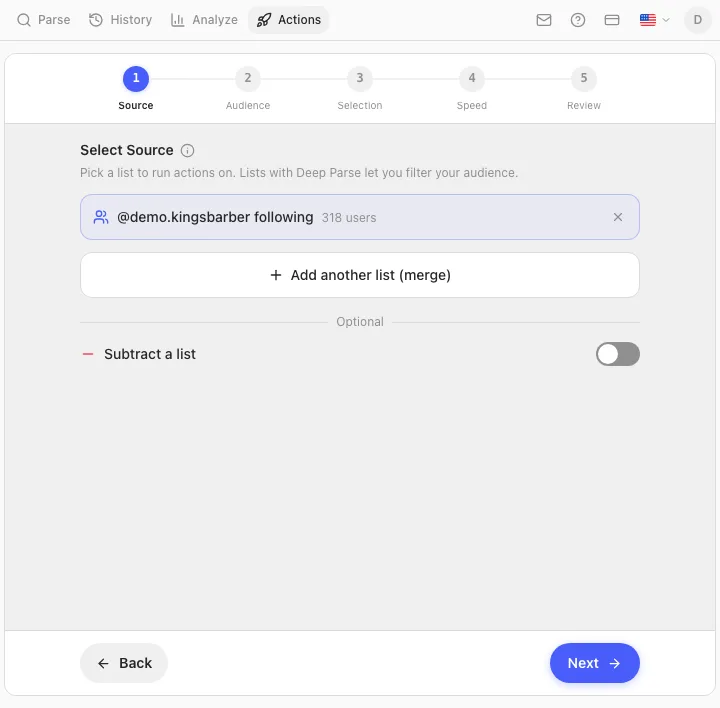
Adım 1 — Kaynak (Source): takipten çıkılacak listeyi seçin
Bir kampanya her zaman parse edilmiş bir listeyle başlar. Önce kendi takip (following) listenizi dışa aktarın — "Following" seçiliyken tek tıkla bir parse; Instagram takip listenizi nasıl dışa aktarırsınız bunu adım adım anlatıyor. Sonra Actions → Unfollow'da bu dışa aktarımı kaynak olarak seçin.
Bilmeye değer iki kaynak seçeneği var:
- Önceki bir follow kampanyası. Daha önce Gramlens ile bir otomatik follow kampanyası çalıştırdıysanız, onu kaynak olarak seçip tam olarak takip ettiği hesapları takipten çıkabilirsiniz — bir "takibe takip" deneyinden mümkün olan en temiz çıkış.
- Birleştir ve çıkar. Birkaç listeyi tek bir kuyrukta birleştirebilir (merge), ya da bir şey çalışmadan önce bir listeyi diğerinden çıkarabilirsiniz (subtract).
Adım 2 — Kitle (Audience): kuyrukta gerçekte kimin olacağına karar verin
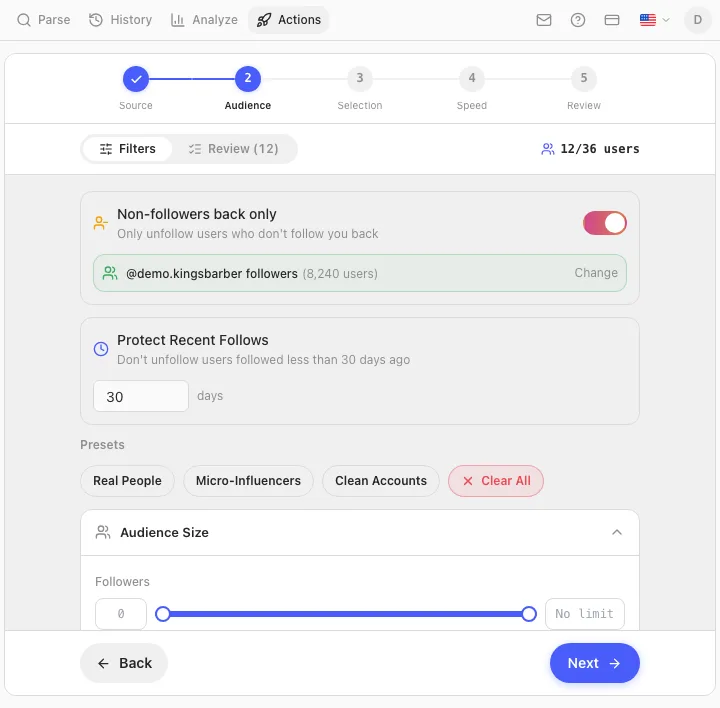
Toplu takipten çıkmanın topal bir alet olmaktan çıktığı yer burasıdır. Kitle adımı, kaç hesabın kaldığını gösteren canlı bir sayaçla birlikte kaynak listesini daraltır:
- Yalnızca geri takip etmeyenler (Non-followers back only) — çoğu temizliğin istediği geçiş. Onu hesabınızın bir takipçi dışa aktarımına yönlendirin — ve kuyrukta yalnızca sizi geri takip etmeyenler kalır.
- Son takipleri koru (Protect Recent Follows) — son N gün içinde takip ettiğiniz hesapları hariç tutar. Bu göründüğünden daha önemli: geçen hafta takip ettiğiniz kişileri takipten çıkmak, tam da Instagram'ın avladığı follow/unfollow döngüsüdür.
- Kitle filtreleri — diğer kampanyalardaki aynı boyut/kalite/anahtar kelime filtreleri, cerrahi davranmak isterseniz (diyelim ki yalnızca profil fotoğrafı olmayan hesapları takipten çıkmak).
Adım 3 — Seçim (Selection): kaç tane, hangi sırayla
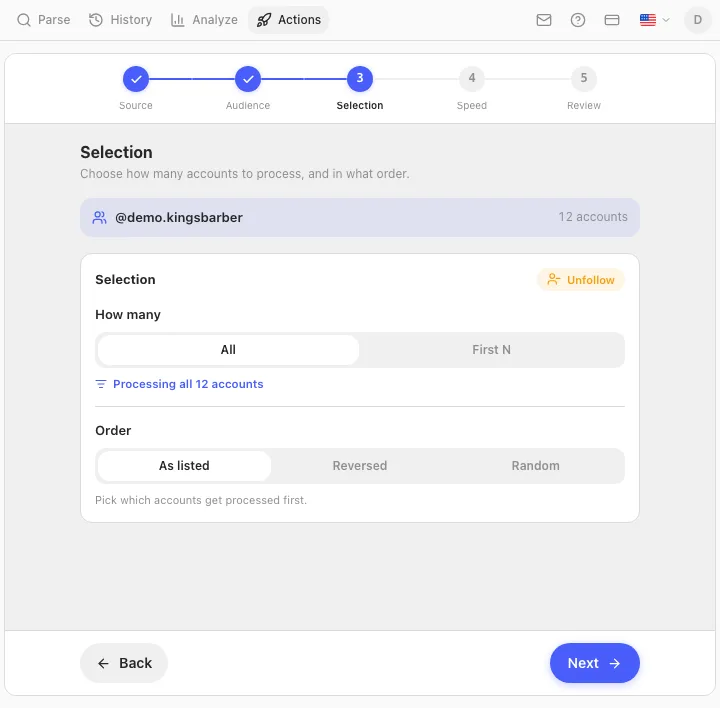
Tümü (All) ya da İlk N (First N) ile işleme sırasını (listelendiği gibi, tersten ya da rastgele) seçin. İlk kampanyanız için makul bir hamle İlk 30–50'dir: bir günlük partinin tamamlanmasını bekleyin, takip listenizden doğru hesapların kaybolduğunu kontrol edin, sonra geri kalanı kuyruğa alın.
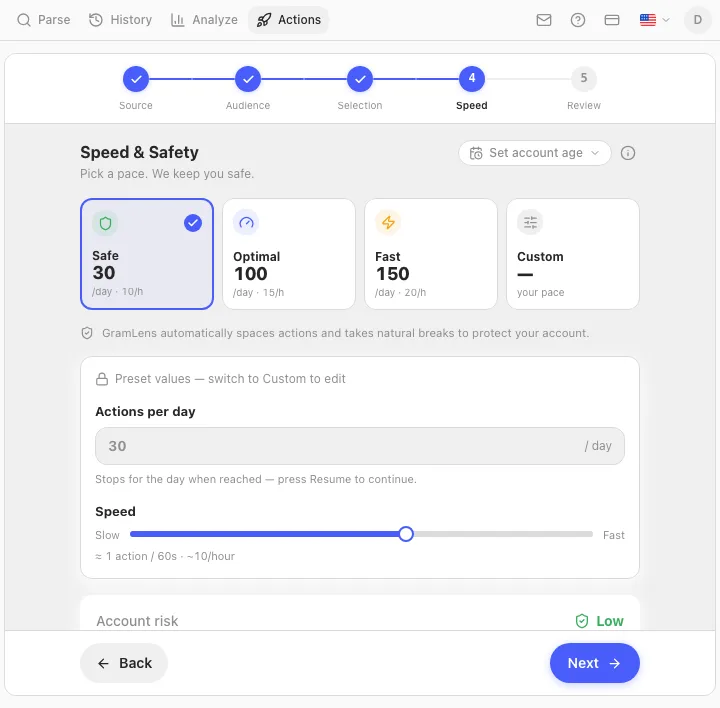
Adım 4 — Hız ve güvenlik (Speed & Safety): bir tempo seçin
Üç hazır ayar yukarıdaki güvenli bölge tablosuyla eşleşir: Güvenli (Safe) (yaklaşık her 60 saniyede bir takipten çıkma, 10/saat, 30/gün), Optimal (100/gün) ve Hızlı (Fast) (150/gün) — artı kendi sayılarınızı istiyorsanız bir Özel (Custom) mod. Bir risk göstergesi seçiminize ve hesabınızın yaşına tepki verir; daha genç hesaplar daha yavaş ayarlara doğru itilir.
Hangi hazır ayarı seçerseniz seçin, altındaki tempo motoru isteğe bağlı değildir. Her gecikme, ritim asla mekanik görünmesin diye rastgele kaydırılır (jitter), çalışma her avuç dolusu eylemden sonra kısa molalar ve oturumlar arasında daha uzun 15–25 dakikalık molalar verir ve Instagram bir challenge ya da "action blocked" yanıtıyla geri iterse, kampanya bir bana doğru yeniden denemek yerine anında durur.
Adım 5 — İnceleme (Review) ve başlat
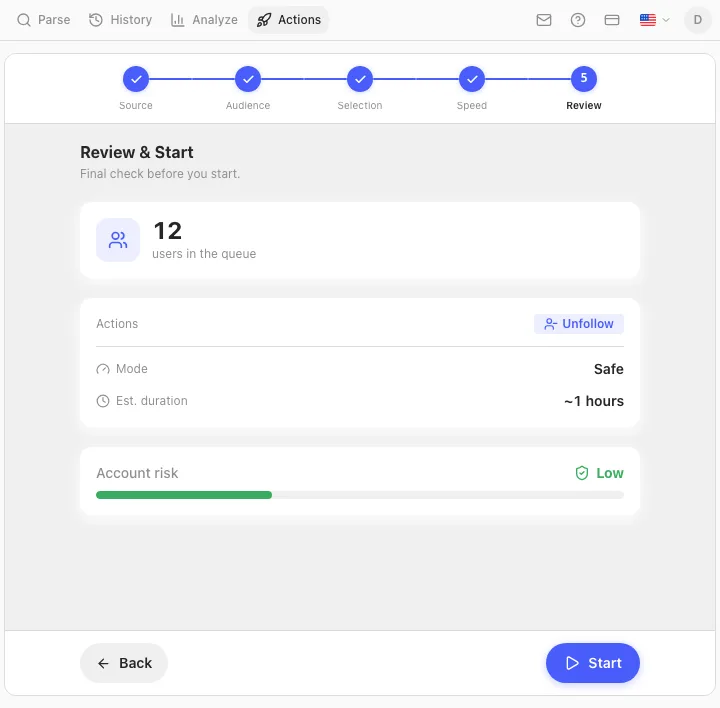
Son ekran kuyruk büyüklüğünü, eylemi, modu ve tahmini bir süreyi gösterir — matematiği burada bilinçli olarak yapın. 300 hesaplık bir temizlik Güvenli'de yaklaşık 10 gün, Optimal'de 3, Hızlı'da 2 gün sürer. Risk göstergesi yüksek gösteriyorsa, Başlat düğmesi bunu açıkça onaylatır ve başlatmadan önce çalışmayı tekrar aşağı çekebilirsiniz.
Çalışırken
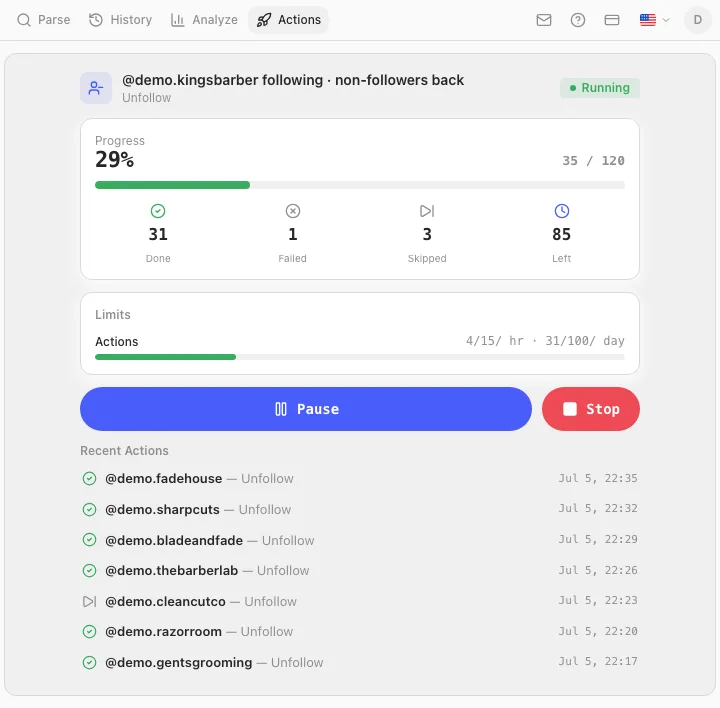
Kampanya, Instagram sekmenizin arka planında canlı bir ilerleme kartıyla çalışır: done/failed/skipped sayaçları ve saatlik ve günlük ödeneğin ne kadarının kullanıldığı. İstediğiniz anda duraklatabilir ya da durdurabilirsiniz ve ilerleme yan paneli kapatmaya — hatta Chrome'u yeniden başlatmaya — dayanır. Tek pratik ipucu: Instagram sekmesini açık tutun, ideal olarak uzaklaştığınız ayrı bir Chrome penceresinde, ve çalışmasına izin verin.
Kimi tutmalı: önemsediğiniz hesapları korumak
Herhangi bir toplu takipten çıkmanın en korkutucu kısmı, tutmayı düşündüğünüz birini kaldırmaktır. Gramlens'te tam anlamıyla "beyaz liste" adında bir düğme yok — bunun yerine birlikte aynı işi yapan dört mekanizma var, ve bunları bilinçli kullanmaya değer:
- Sizi geri takip eden herkesi tutun. Adım 2'deki Yalnızca geri takip etmeyenler (Non-followers back only) geçişi en geniş korumadır: karşılıklılar kuyruğa hiç girmez.
- Son takipleri koruyun. Hariç tutma penceresini (diyelim ki 30 gün) ayarlayın ki kampanya yakın zamanda takip ettiğiniz hesaplara dokunamasın — hâlâ sizin için önemli olma olasılığı en yüksek ve Instagram'ın bakış açısından takipten çıkması en riskli olan kişiler.
- Kuyruğu elle inceleyin. Kitle adımında, filtrelerden geçen her hesabı listeleyen bir İnceleme (Review) sekmesi var. Tutmak istediğiniz herkesin işaretini kaldırın — filtreleri geri dönüp değiştirseniz bile elle hariç tutmalar kalıcıdır.
- Bir tut-listesini çıkarın. Asla dokunulmaması gereken hesapların — müşteriler, ortaklar, arkadaşlar — parse edilmiş bir listesini tutuyorsanız, onu Adım 1'de kaynaktan çıkarın (subtract) ve kuyruğa girmeleri yapısal olarak imkânsız olsun.
İlk bir temizlik için makul bir varsayılan: yalnızca geri takip etmeyenler, 30 günlük koruma, sonra Başlat'a basmadan önce İnceleme sekmesini göz gezdirerek iki dakika.
Sık sorulan sorular
Instagram'da günde kaç hesabı takipten çıkabilirim?
Resmi bir sayı yok, ama takipten çıkmalar hesabınızın genel günlük eylem bütçesini paylaşır. Topluluk gözlemi, iyi durumda olgun bir hesap için makul bir tavanı günde 100–150 takipten çıkma civarına, yeni hesaplar ya da yakın zamanda action block yemiş herhangi bir şey için ise 30'a yakın koyar. Saatlik ritim, günlük toplam kadar önemlidir — bir güne yayılmış 150 takipten çıkma sorun değilken, bir saatte 150 bir engellemedir. Tam döküm için Instagram takip limitleri yazısına bakın.
Toplu takipten çıktığım için Instagram beni banlar mı?
Yalnızca takipten çıkmadan dolayı doğrudan bir ban çok olası değildir. Riske attığınız şey bir action block'tur: takip etme ve takipten çıkma üzerine geçici bir kilit, tipik olarak ilk seferde 24–48 saat ve tekrarlarda daha uzun. Engellemeler hızdan ve kalıptan gelir — bir patlamada yüzlerce eşit aralıklı takipten çıkma — toplam sayıdan değil. Doğru tempoda, çok binlik bir temizlik bile olaysız geçer; sadece bir öğleden sonra yerine günler alır.
Instagram'da herkesi takipten çıkmak iyi bir fikir mi?
Genellikle değil. "Herkesi takipten çık ve sıfırdan başla" sıfırlaması dramatik görünür ve verimli hissettirir, ama akışınızı yok eder, fark eden karşılıklıların kafasını karıştırır ve — tek bir süpürmede yapıldığında — en riskli eylem kalıbının en riskli versiyonudur. Filtrelenmiş bir temizlik (geri takip etmeyenler, aktif olmayan hesaplar, ölü dükkanlar) size faydanın %90'ını hiçbir dramaya girmeden verir. İstisna, eski takip listesinin alakasız olduğu gerçek bir yeniden markalaşmadır; o zaman bile haftalara yayın.
Yalnızca beni geri takip etmeyenleri takipten çıkabilir miyim?
Evet — Gramlens'te bir takipten çıkma kampanyasının varsayılan biçimi budur. Takip listenizi ve takipçilerinizi dışa aktarın, ve Yalnızca geri takip etmeyenler (Non-followers back only) geçişi ikisini çapraz kontrol eder, böylece kuyruğa yalnızca karşılıklı olmayanlar girer. Bir kampanyaya girişmeden önce o listeyi görmek isterseniz, aynı çapraz kontrol ücretsiz ve salt-okunur bir görünüm olarak da var: Instagram'da sizi kimin geri takip etmediğini nasıl görürsünüz. Yeni takip ettiğiniz kişilerin aday olmadan önce geri takip etmeye zaman bulması için bunu son takipleri koruma ile birleştirin.
Takipten çıkmak ile bir takipçiyi kaldırmak arasındaki fark nedir?
Yön. Unfollow giden listenizi temizler — takip ettiğiniz hesaplar. Takipçileri kaldır (Remove Followers) gelen listenizi temizler — sizi takip eden hesaplar, onları engellemeden. Bunlar Gramlens'te ayrı Manage eylemleridir ve gelen versiyonun kendi rehberleri var: genel bir temizlik için Instagram'da takipçileri toplu kaldırma, özellikle bot saldırısı durumu içinse bot takipçileri nasıl kaldırırsınız. Hedefiniz "gönderilerini görmeyi durdurmak"sa Unfollow istersiniz; "onların benimkileri görmesini durdurmak"sa Remove Followers istersiniz.
Instagram'da ücretsiz toplu takipten çıkabilir miyim?
Gramlens ile değil — Unfollow eylemi Pro planının ($11.99/ay) bir parçasıdır, Remove Followers, Comment ve daha hızlı hız modlarıyla birlikte. Ücretsiz yapabildiğiniz şey buna kadar olan her şeydir: takip listenizi dışa aktarın, tam olarak kimin geri takip etmediğini görmek için onu takipçilerinizle çapraz kontrol edin ve aynı tempo motorunu Güvenli modda bir Follow ya da Like kampanyasında deneyin. ~50 hesaptan az tek seferlik bir temizlik için araçları atlayın ve bunu elle yapın.
Instagram, birini takipten çıktığınızda o kişiyi bilgilendirir mi?
Hayır. Bildirim yoktur ve etkinlik akışlarında hiçbir şey görünmez. Bunu ancak profilinizi elle kontrol ederek ya da takipçi listelerini zaman içinde karşılaştıran (diff) bir izleyici kullanarak öğrenebilirler — ki bu, tesadüfen, tam olarak kimin sizi takipten çıktığını görebilme şeklinizdir.
Terimler hakkında bir not: otomatik eylemler — otomatik takipten çıkma dahil — onları hangi araç gerçekleştirirse gerçekleştirsin Instagram'ın Kullanım Koşulları'na aykırıdır. Tempo ayarı ve tavanlar engelleme riskini azaltır; kuralları değiştirmezler. Gramlens, Instagram ya da Meta ile bağlantılı değildir.
Özet. Instagram toplu takipten çıkanları takipten çıkma için değil, hız için engeller. Hesap yaşına bağlı olarak saatte ~10–20 ve günde ~30–150 takipten çıkmanın altında kalın; 50'nin altındaki temizlikleri elle yapın. Daha büyük her şey için: takip listenizi dışa aktarın, son takipleriniz korunmuş halde onu geri takip etmeyenlere filtreleyin ve kuyruğu günlere yayarak işleyen ve Instagram itiraz ettiği an kendini durduran ölçülü bir Gramlens Unfollow kampanyası (Pro, $11.99/ay) olarak çalıştırın.
Özelliği keşfedin