
Turn your Instagram audience into
a working contact list
Export your followers and enrich them with email, phone, website and city. CSV, Excel or JSON — ready for your CRM.
hero-parse.webp
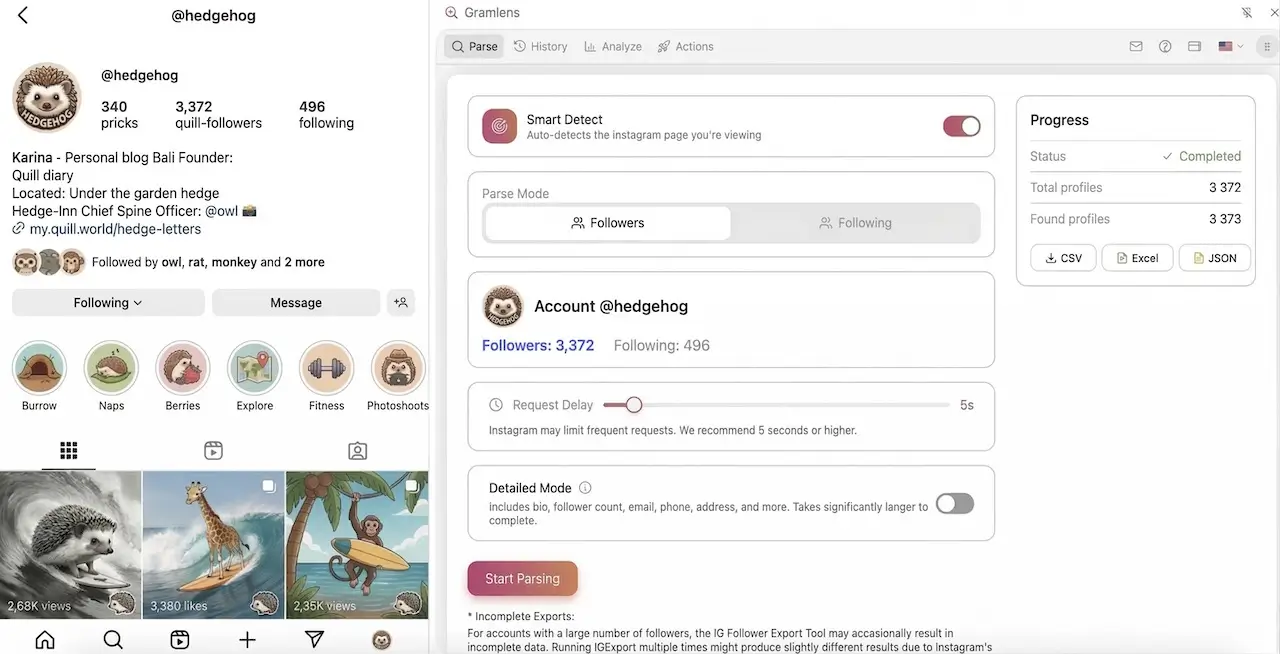
Gramlens Chrome side panel open next to the profile page @demo.kingsbarber. The Parse tab is active: Smart Detect on, Followers mode selected, a Settings card with a Request Delay slider (5s) and a Deep Parse toggle, the parsed results list, a Completed 100% progress bar, and an Export button (CSV, Excel, JSON).
What you get at the end
One row per follower — Excel, Google Sheets or your CRM.
export-file.webp
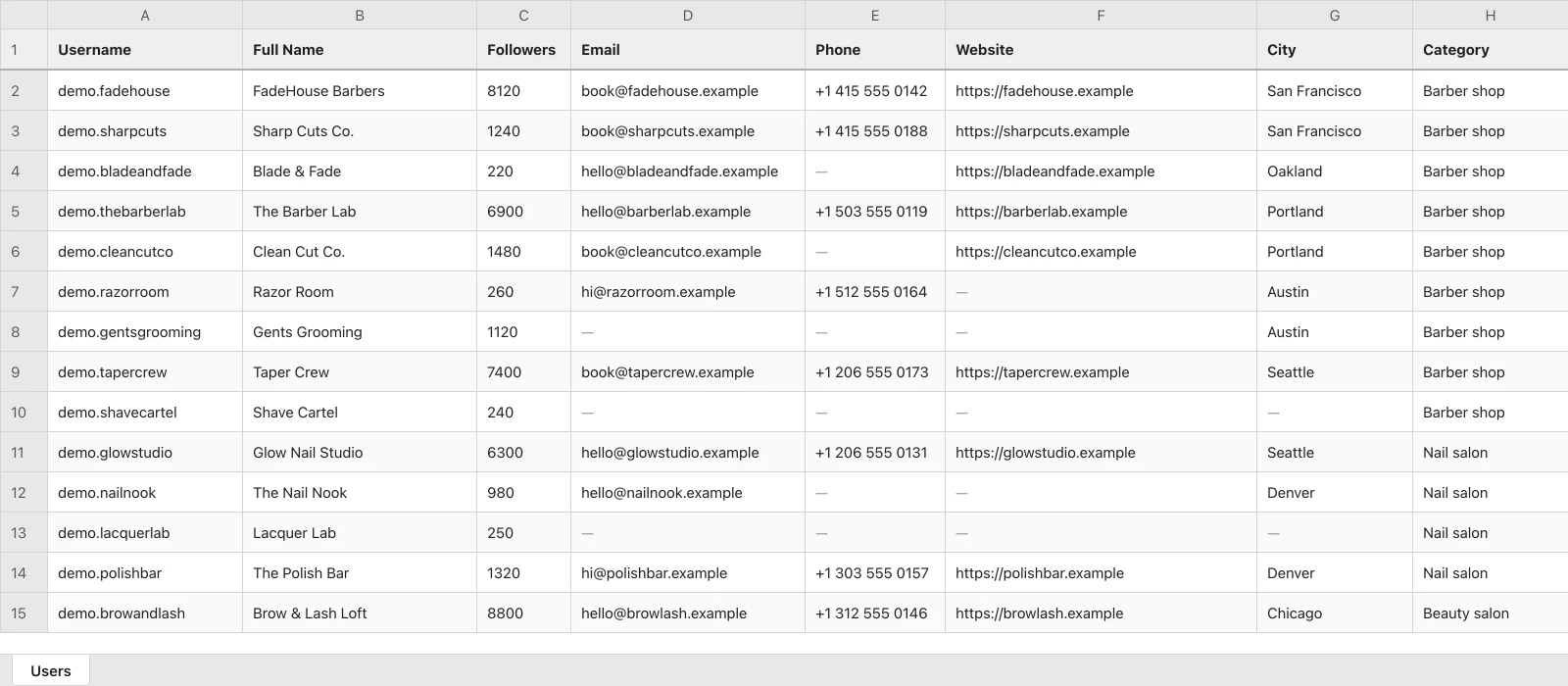
A spreadsheet of exported followers with username, full name, followers, email, phone, website, city and category columns.
The columns
Username, name, profile link, followers, email, phone, website, city, category.
CSV, Excel or JSON
Pick the format on export, tick only the columns you need.
Where it goes
Excel, Google Sheets, a CRM or an email platform take the same file.
The whole path: parse the list, run Deep Parse, export the file.
Who Gramlens is for
Sales and lead gen
A contact list built from the followers of any public profile in your niche.
Agencies and SMM
Audience reports for clients: who arrived, who left, and whose followers you share with a competitor.
Creators and brands
Reach the accounts you picked with follows, likes and comments at a safe pace.
Deep Parse: contacts, not just handles
A plain follower list is names. Deep Parse opens every account in the list and collects what the profile shows publicly.
Collected for each account
- Bio
- Followers
- Following
- Posts
- Phone
- Website
- Business account
- Private account
- Category
- City
Contact fields are filled where the profile published them itself — usually business and creator accounts. How much of a list comes back with contacts depends on the audience, so the panel counts it for you as it runs.
Free covers 500 records. Plus and Pro remove the cap.
See plans and limitsdeep-parse-panel.webp
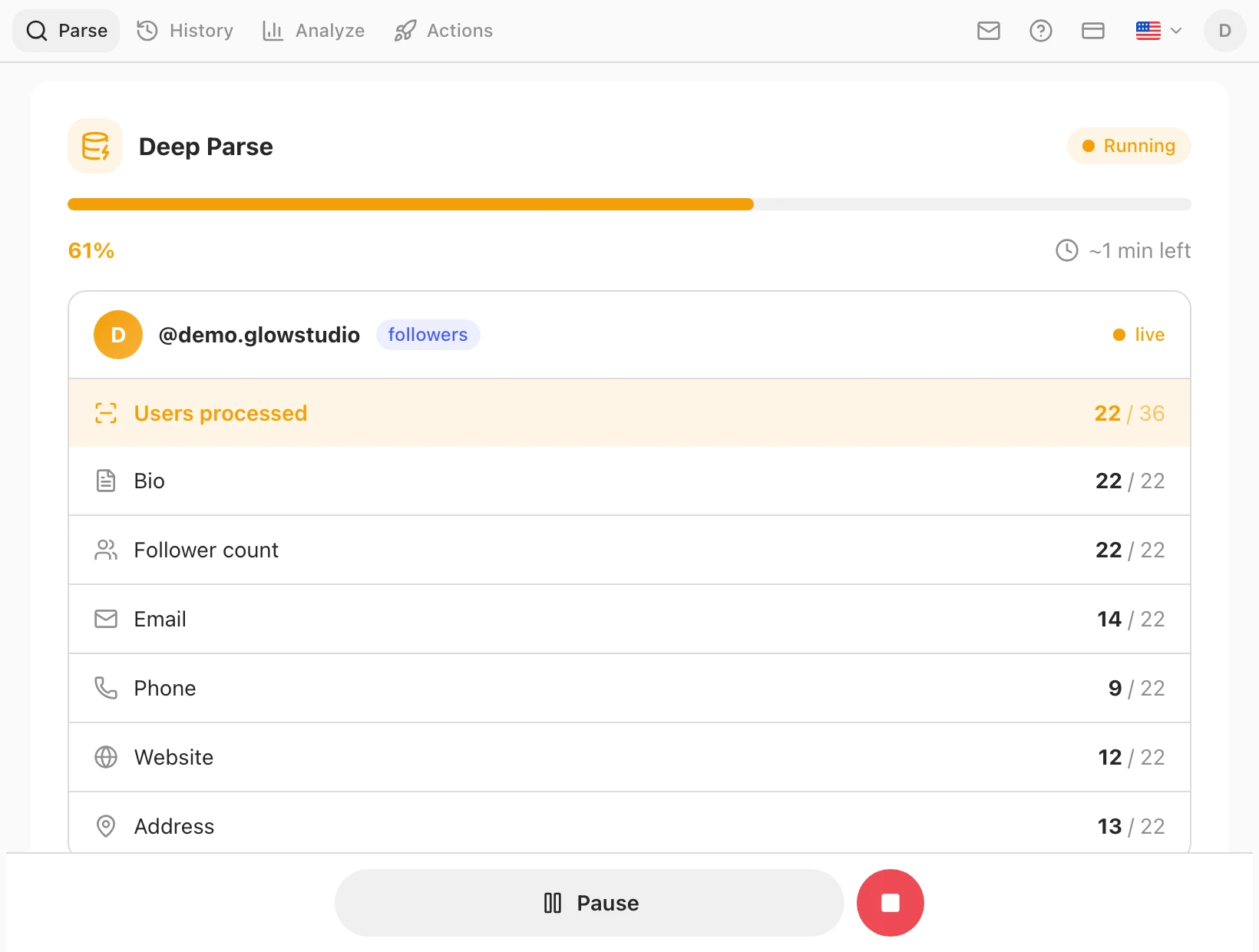
The Gramlens Deep Parse panel: progress, accounts processed, and how many of them have an email, phone, website and address.
Simple Pricing
Choose the plan that works best for you. Upgrade or cancel anytime.
Free — lists of up to 500
Plus — removes the volume cap
Pro — adds automation
Free
Perfect for getting started
- Parsing — up to 500
- Deep Parse — up to 500 records
- Try automation free: follow & like on Safe mode
- Basic analytics (50 Analyse views / month)
- CSV, Excel & JSON export
- Download media: posts, Reels & Stories
- Storage on your device — no time limit
Plus
Most PopularFor regular users
- Everything in Free
- Unlimited parsing
- Unlimited Deep Parse
- Unlimited Analyse views (full analytics)
- History, comparison & filters
- Storage on your device — no time limit
Pro
For power users with full Actions
- Everything in Plus
- Full Actions: comments & keyword targeting
- Optimal / Fast / Custom speed modes
- Manage: bulk unfollow & remove followers
- Advanced filters
- Storage on your device — no time limit

Detailed Feature Comparison
| Feature | Free | Plus | Pro |
|---|---|---|---|
| Export | |||
| Followers export limit | 500 | Unlimited | Unlimited |
| Following export limit | 500 | Unlimited | Unlimited |
| Comments export limit | 500 | Unlimited | Unlimited |
| Likes export limit | 500 | Unlimited | Unlimited |
| Deep Parse | 500 | Unlimited | Unlimited |
| Media download | |||
| Post photos & videos (incl. carousels) | |||
| Reels video download | |||
| All current Stories in one click | |||
| Analysis | |||
| Profile analyse views | 50 / mo | Unlimited | Unlimited |
| Track unfollowers | 50 / mo | ||
| Compare accounts | 50 / mo | ||
| Followers timeline | 50 / mo | ||
| Quick Actions | |||
| Follow | |||
| Like | |||
| Safe mode | |||
| Comment | — | — | |
| Unfollow / remove (Manage) | — | — | |
| Optimal / Fast / Custom modes | — | — | |
| Keyword targeting | — | — | |
| Account Quality & Content filters | — | — | |
Export
- Followers export limitUnlimited
- Following export limitUnlimited
- Comments export limitUnlimited
- Likes export limitUnlimited
- Deep ParseUnlimited
Media download
- Post photos & videos (incl. carousels)
- Reels video download
- All current Stories in one click
Analysis
- Profile analyse viewsUnlimited
- Track unfollowers
- Compare accounts
- Followers timeline
Quick Actions
- Follow
- Like
- Safe mode
- Comment—
- Unfollow / remove (Manage)—
- Optimal / Fast / Custom modes—
- Keyword targeting—
- Account Quality & Content filters—
* "Unlimited" means no plan-imposed cap. For very large accounts (about 50,000+ profiles), a complete export in a single run can't be guaranteed — Instagram may throttle, pause, or interrupt the session to verify activity, which is outside Gramlens's control. Your progress is always saved, so you can wait and resume.
Three lists Instagram will never show you
The follower count moves, but Instagram never says which names changed. Gramlens builds the lists from your own saved snapshots — in your browser, without a password.
- Who doesn't follow you backCross-references your following list against your followers and leaves the accounts that never followed you back.
- Who unfollowed you, and whenEvery parse saves a snapshot. The timeline diffs them day by day: who left, who arrived, on which date.
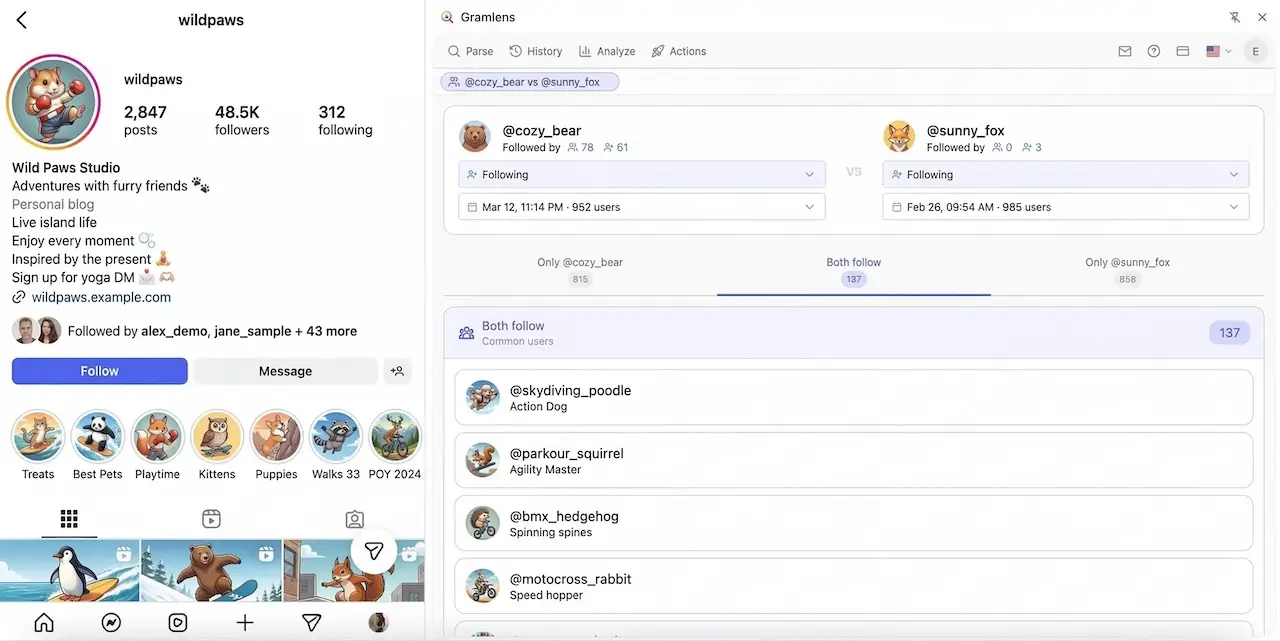
- Whose audience you sharePut any two profiles side by side and get three lists: only theirs, only yours, and the followers you both have.
All three live in the Analyze tab: 50 views a month on Free, unlimited on Plus. They read lists you have already parsed, so a comparison needs both accounts parsed first.
tour-compare.webp
The Gramlens account comparison: two profiles side by side, each with its own list type and snapshot date, and three tabs — only the first account, follow both, only the second.
Automated actions and account protection
Gramlens can follow, like and comment for you. The pacing is not a black box — these are the defaults it ships with.
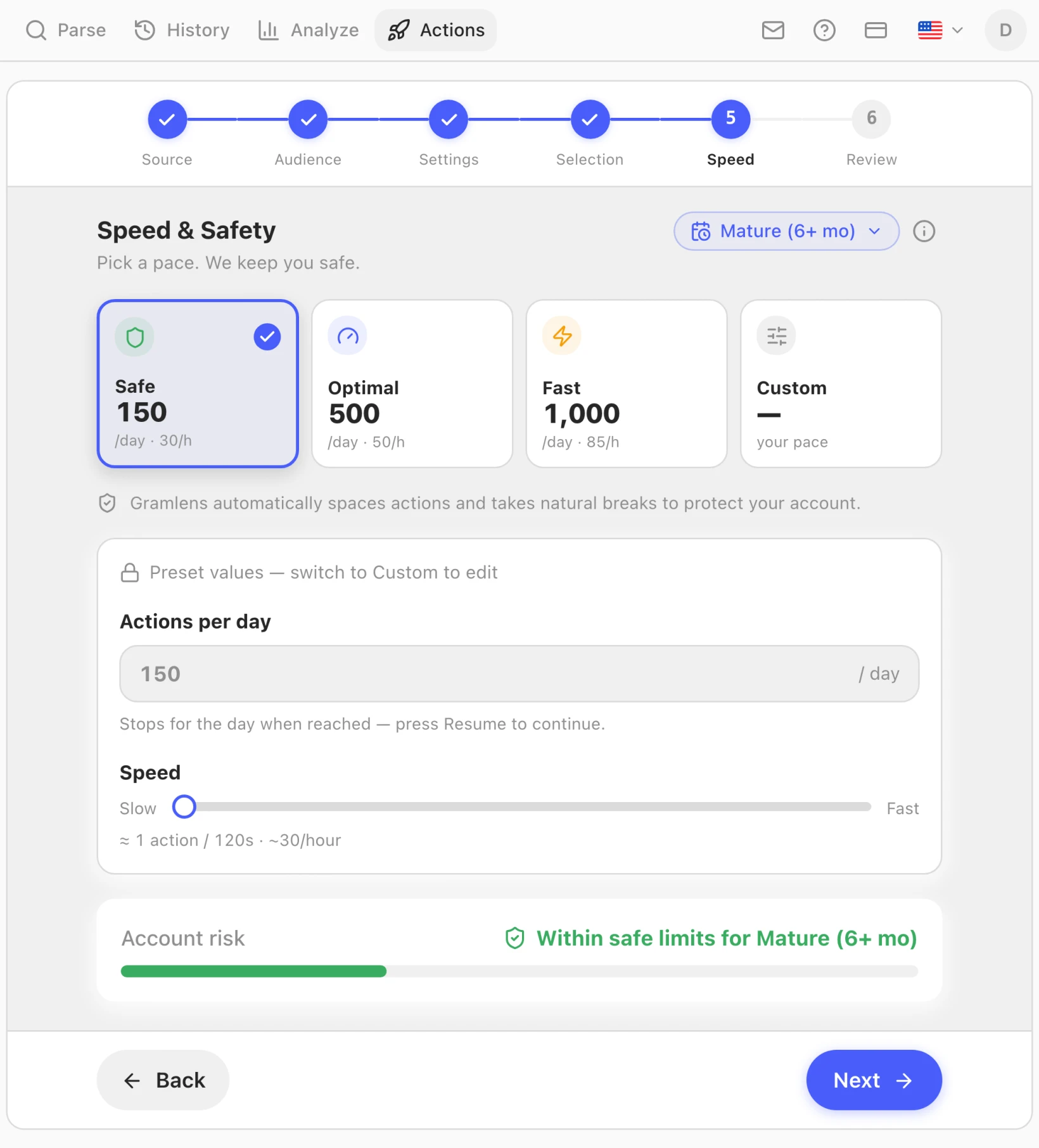
- Safe mode: 150 actions a day, around 30 an hour — that is the budget for follow, like and comment. Bulk Manage (unfollow, remove followers) is paced lower: 30 a day, 10 an hour.
- At least 120 seconds between two actions.
- Every gap is randomised and never drops below 20 seconds, whichever mode you pick.
- Operations are interleaved across accounts instead of firing in one burst.
- A 15–25 minute break every 60–80 actions.
- On the first checkpoint or action block from Instagram the queue stops and does not retry — what happens next is your call.
The queue runs inside the Instagram tab, so that tab has to stay open while it works. Progress is saved as it goes, so a run can be picked up later.
Follow and like in Safe mode are on every plan, Free included. Pro adds comments, unfollow and follower cleanup, the faster presets and the audience filters.
What is included in Proactions-safety.webp
The Gramlens speed step with Safe selected: 150 actions a day, about 30 an hour, roughly one action every 120 seconds, and the account risk meter in the green.
quick-follow-filters.webp
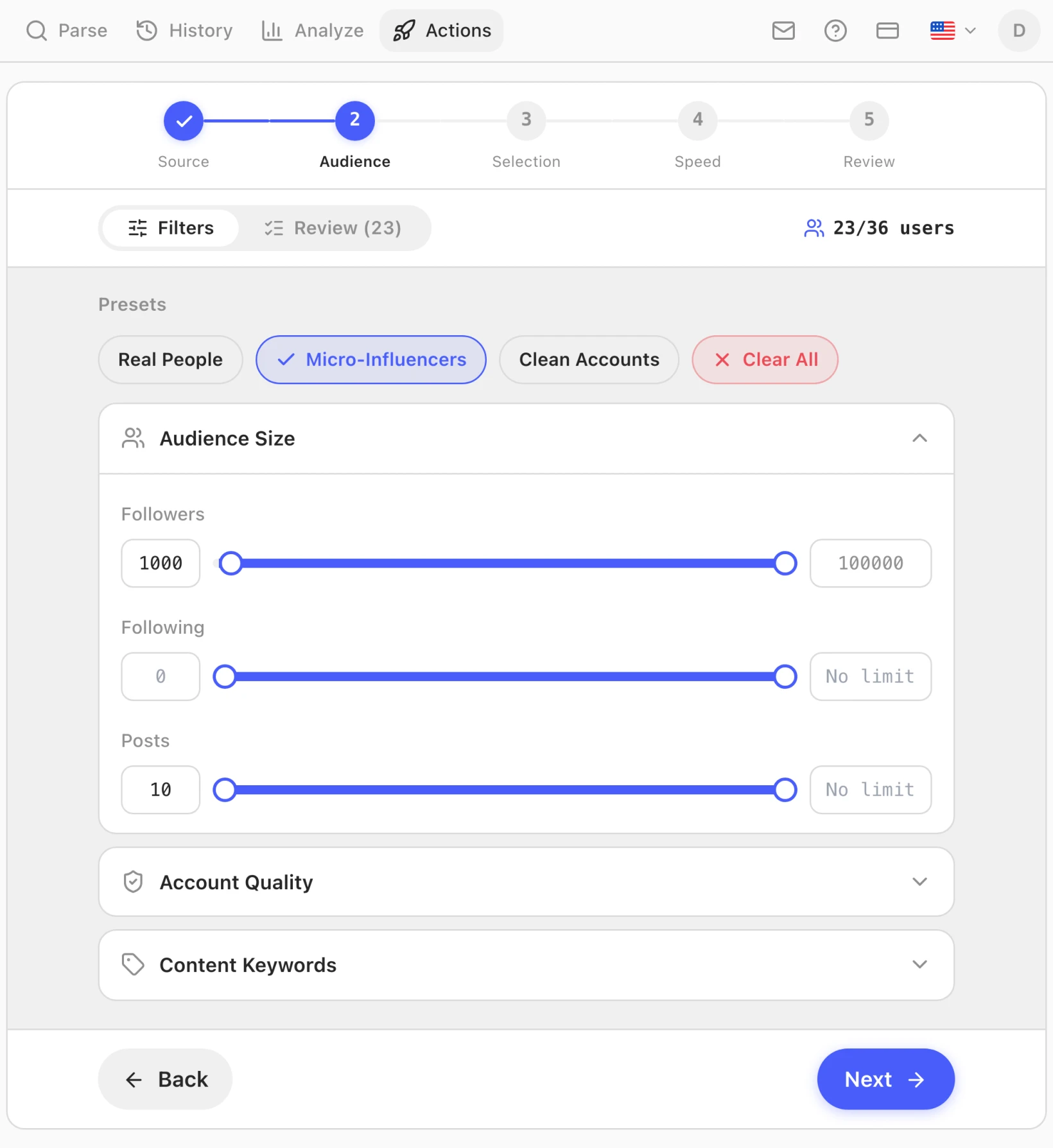
The Gramlens audience step with the Micro-Influencers preset applied: follower, following and post ranges, and 23 of 36 accounts left after filtering.
How It Works
Install the Extension
Add Gramlens from the Chrome Web Store and create a free account — email or Google, about 30 seconds.
Open Any Profile
Open any Instagram profile and click the Gramlens icon. It reads the public follower list.
Export & Download
Turn on Deep Parse for email, phone, website and city, then download CSV, Excel or JSON. Keep the tab open while it runs.
What else it does
Export
Followers, following, comments and likes.
Deep Parse
Email, phone, website, city and category.
Download Media
Save post photos, videos, Reels and Stories in original quality — free.
Unfollowers
Who left, and who never followed back.
Compare accounts
Whose audience you share with any other profile.
Actions
Follow, like and comment at a human pace.
Security and your data
No Instagram password, none of your data on our servers, and a company you can look up in a public register.
Your Instagram password stays yours
Gramlens never asks for it and never stores it. It works inside the session already open in your browser — the same one you use to browse Instagram yourself.
Your data never leaves your computer
Follower and following lists, your parsing history and the Deep Parse results are written to your own browser's database. Nothing is uploaded to Gramlens servers — we never see them, and nothing is deleted on a timer. On the Free plan the Analyze tab shows accounts from the last seven days; Plus and Pro lift that window.
Delete whenever you want
Removing an entry from History wipes the saved result from your device right away. Keep the lists that matter as CSV, Excel or JSON: uninstalling the extension or clearing browser data deletes the history for good. Before either, the Storage tab saves your whole history as a single ZIP backup.
Payments go through Stripe
Card details are entered on the Stripe side and never reach Gramlens. Subscriptions are managed from your account page.
You can cancel at any time from your account page.
Frequently Asked Questions
Ready to See Your Real Audience?
Free signup in seconds — no credit card, no commitments.