
Comment retirer des abonnés Instagram en masse (sans bloquer personne)
Instagram ne retire les abonnés qu'un par un. Ce que retirer fait vraiment, quand une purge sert, et comment en mener une sans se faire bloquer.
Instagram propose un bouton « Retirer cet abonné » depuis 2019. Il est enfoui sous deux taps, agit sur exactement un compte à la fois, et n'offre aucun moyen de trier, filtrer ou sélectionner. Si ce que vous voulez retirer, ce sont quatre cents comptes dormants arrivés pendant un jeu-concours, la fonctionnalité existe techniquement et est complètement inutilisable.
Ce guide couvre tout le travail : ce que retirer un abonné lui fait et vous fait vraiment, quand une purge vaut le coup et quand elle relève de la superstition, et comment en mener une en masse sans que le rythme ne déclenche les limites d'Instagram. Si vous êtes arrivé ici à cause d'une vague soudaine de bots plutôt que d'un nettoyage général, comment supprimer les faux abonnés sur Instagram traite ce cas plus étroit avec un flux de travail par comparaison de référence.
Retirer, bloquer et se désabonner sont trois choses différentes
Ces mots s'emploient l'un pour l'autre dans toutes les discussions sur le sujet, et leurs différences sont précisément ce qui permet de choisir.
Retirer un abonné coupe un sens de la relation : il cesse de vous suivre, vos publications quittent son fil. Il n'est ni bloqué ni restreint, il peut toujours voir votre profil s'il est public, et il peut vous suivre à nouveau dès qu'il s'en aperçoit — ce que la plupart ne feront jamais, parce qu'Instagram n'envoie aucune notification.
Bloquer coupe tout, masque entièrement votre profil pour cette personne, et se voit à la seconde où elle vous cherche. C'est le bon outil pour une personne dont vous ne voulez pas près de votre compte, et un très mauvais outil pour faire le ménage dans une audience.
Se désabonner va dans l'autre sens complètement — ça retire des comptes de votre liste d'abonnements, pas vous de la leur. Si votre problème est un fil encombré plutôt qu'un nombre d'abonnés gonflé, c'est ce guide qu'il vous faut : comment se désabonner en masse sur Instagram sans risque.
Une distinction de plus, qui compte pour le rythme : retirer un abonné, c'est votre compte qui agit sur quelqu'un d'autre, et c'est pour ça que ça compte dans les limites d'actions au même titre que s'abonner et se désabonner.
Quand retirer des abonnés en vaut la peine
Les purges d'abonnés ont un parfum de superstition, alors voici les cas où l'arithmétique fonctionne vraiment — et celui où elle ne fonctionne pas.
Les résidus de bots et de jeux-concours. Mille comptes arrivés en trois jours et qui n'ont jamais rouvert l'application depuis pèsent réellement sur la distribution. Instagram décide qui voit une publication en partie d'après la réaction de la première tranche de votre audience ; quand cette tranche est morte, la publication cale avant d'atteindre qui que ce soit qui aurait interagi. Les retirer augmente la proportion de votre audience qui répond réellement.
Le taux d'engagement sur lequel on vous juge. Si 8 000 abonnés vous donnent 200 likes, ça se lit 2,5 %. Retirez 1 500 comptes morts et les mêmes 200 likes se lisent 3,1 %. Rien n'a changé à votre portée — mais si des marques et des agences vous tarifent d'après ce nombre, ce nombre compte commercialement, que ce soit justifié ou non.
Les comptes dont vous ne voulez pas comme lecteurs. Un concurrent qui surveille votre fil, un ex, un service d'achat d'abonnés que vous regrettez. Un par un, c'est à ça que sert le bouton intégré ; à cent, non.
Là où ça ne marche pas : courir après un ratio pour lui-même. Retirer des abonnés réels et engagés pour faire joli sur un pourcentage vous coûte exactement les gens qui font ce pourcentage. Si votre engagement est faible et votre audience réelle, le problème c'est le contenu, et aucune purge ne le réglera.
Trouvez les comptes avant de retirer quoi que ce soit
La purge, c'est la moitié facile. Décider qui est la moitié qui détermine si tout ça aide ou nuit, et c'est bien plus simple avec la liste sous les yeux que dans l'application Instagram.
Commencez par parser vos abonnés avec l'extension Chrome Gramlens — ouvrez votre profil sur instagram.com, cliquez sur l'icône, lancez un parsing Followers (abonnés). Ça vous donne un instantané daté de toute la liste, que vous pouvez lire, trier et exporter. Comment exporter les abonnés Instagram en CSV parcourt l'exécution et les champs de sortie.
Deux choses valent la peine d'être faites avant de décider quoi que ce soit :
- Lancez Deep Parse sur la liste. Il ouvre chaque profil et recueille ce qui est public — bio, nombres d'abonnés et d'abonnements, nombre de publications, présence d'une photo de profil, compte professionnel ou non. Ce sont les champs sur lesquels travaillent les filtres d'audience, et un compte sans photo, sans publication et avec 4 000 abonnements n'est pas la même affaire qu'un compte avec un vrai fil.
- Regardez quand ils sont arrivés. Si vous avez plus d'un instantané d'abonnés, la Chronologie montre les arrivées groupées par date, et une vague de bots est reconnaissable entre mille — trois cents comptes en un jour, tous taillés pareil. C'est le flux de travail de comment voir qui s'est désabonné de vous sur Instagram, lu dans l'autre sens.
Mener un retrait en masse, étape par étape
Remove Followers vit dans Gramlens sous Actions → Manage (gestion), aux côtés d'Unfollow, et suit le même assistant en cinq étapes. C'est une fonctionnalité Pro ; le parsing et l'examen ci-dessus, non.
Étape 1 — Source : votre liste d'abonnés
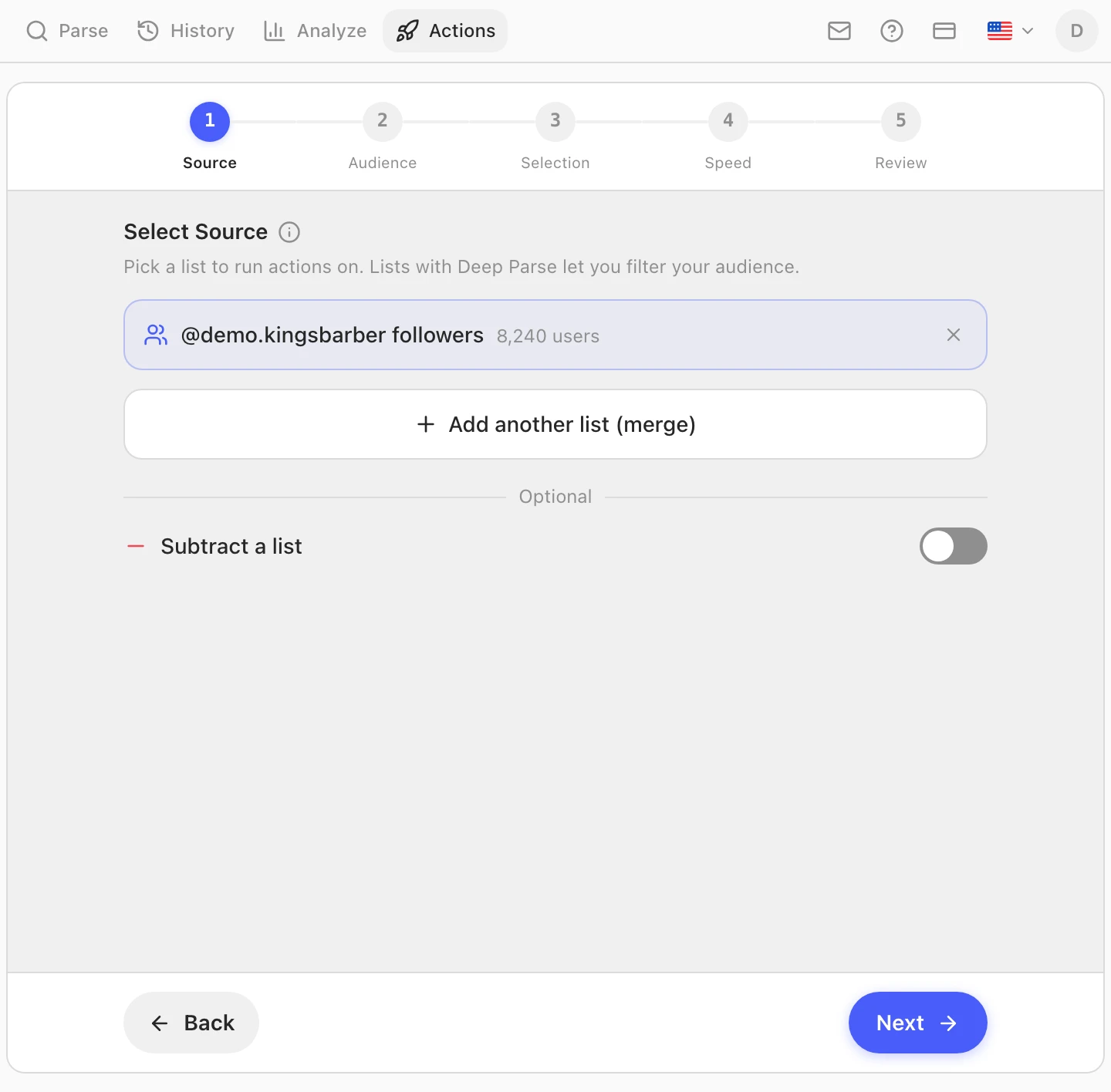
Le sélecteur de source est filtré sur les instantanés d'abonnés, parce que c'est la seule liste dont vous pouvez retirer des gens. Choisissez le parsing que vous venez de lancer. Vous pouvez fusionner plusieurs listes, ou en soustraire une — soustraire une liste à conserver est la façon la plus simple de protéger un groupe de comptes en bloc.
Étape 2 — Audience : réduisez aux comptes que vous visiez
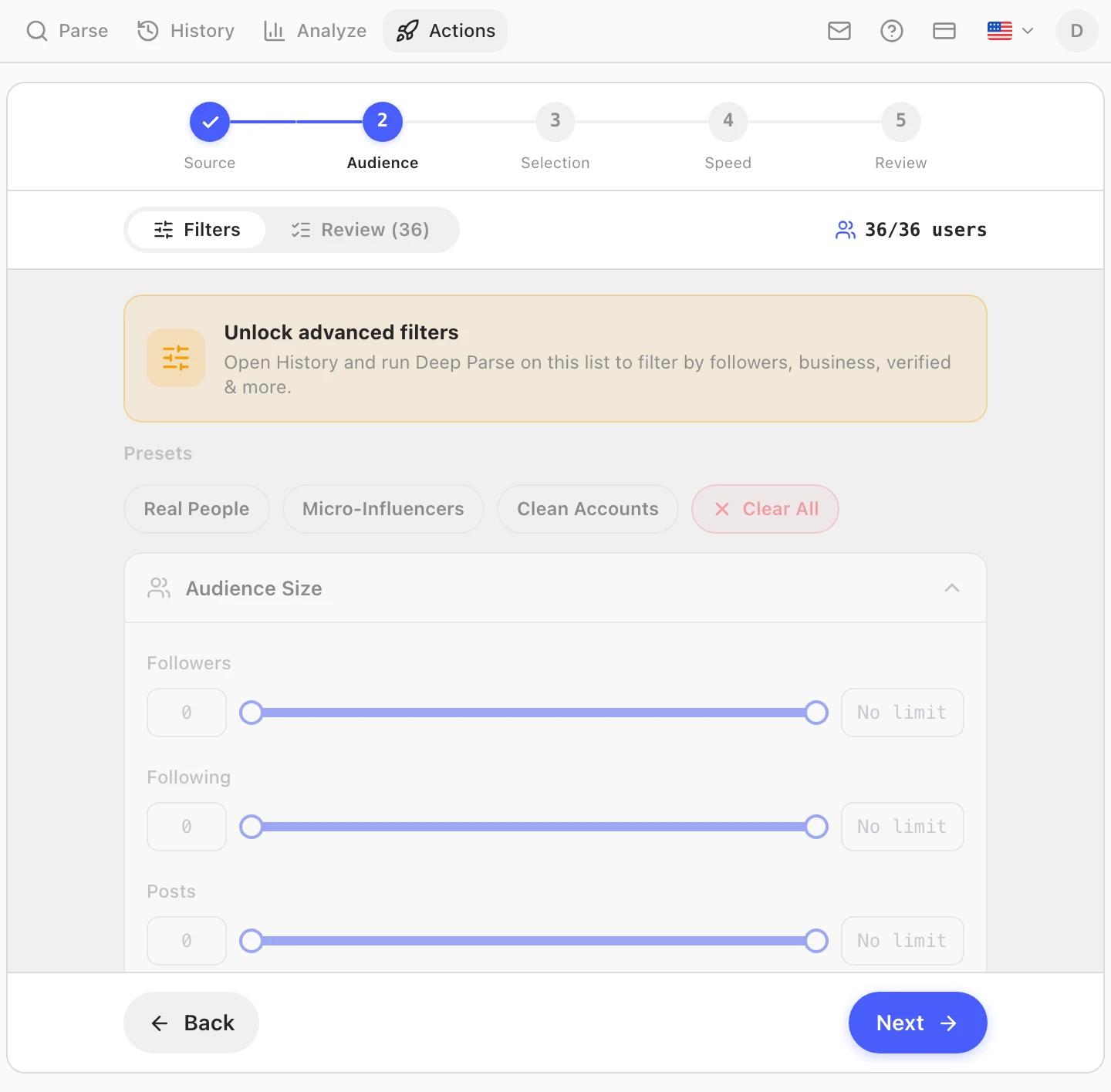
C'est ici qu'une purge cesse d'être un outil contondant. Avec une source passée par Deep Parse, les filtres d'audience travaillent sur de vrais signaux de profil : plages d'abonnés et d'abonnements, nombre de publications, présence d'une bio ou d'une photo, professionnel ou personnel, certifié ou non. Le préréglage Clean Accounts (comptes propres) est un point de départ raisonnable pour un balayage de bots ; les filtres Account Quality et par mots-clés sont réservés à Pro.
Ouvrez ensuite l'onglet Review (révision) et regardez pour de bon. Chaque compte passé à travers les filtres y est listé, cherchable, et peut être écarté à la main avant que quoi que ce soit ne s'exécute. C'est l'étape que les gens sautent et regrettent ensuite — les filtres sont des approximations, et cinq minutes de lecture rattrapent le vrai client au profil vide qui allait être retiré comme un bot.
Étape 3 — Sélection : combien et dans quel ordre
Choisissez tous les comptes ou les N premiers, et fixez l'ordre : tel quel, inversé, ou aléatoire. L'ordre dans lequel Instagram renvoie une liste n'est pas chronologique : aucune de ses extrémités ne correspond aux « plus récents ». Inversé et aléatoire ne font que déplacer le point de départ d'un ordre arbitraire. Que les indésirables sont arrivés en dernier. Rien n'oblige à mettre toute la purge en file d'un coup — quelques centaines à la fois, sur plusieurs jours, c'est à la fois plus sûr et plus facile à interrompre en cours de route.
Étape 4 — Vitesse et sécurité
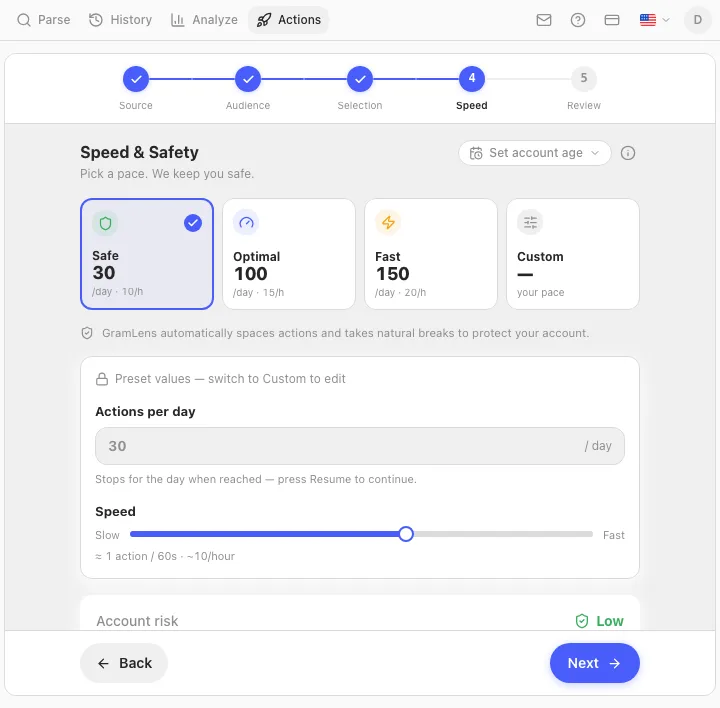
Les préréglages sont les mêmes qu'ailleurs dans Manage : Safe fait 30 retraits par jour, Optimal 100, Fast 150. Ce qui se trouve dessous compte davantage que les chiffres :
- Les intervalles entre actions sont randomisés sur une courbe log-normale et ne descendent jamais sous 20 secondes, quel que soit le préréglage choisi.
- Une courte pause de deux à cinq minutes toutes les cinq à dix actions.
- Une pause plus longue de 15 à 25 minutes toutes les 60 à 80 actions, toujours active, non désactivable.
- Atteignez le plafond horaire et la file se met au repos une heure entière ; atteignez le plafond quotidien et elle s'arrête et vous attend.
- La première fois qu'Instagram renvoie un challenge, un checkpoint ou une réponse feedback-required, la file s'arrête sans réessayer. Elle ne temporise pas pour retenter — elle vous rend la décision.
Étape 5 — Révision et lancement
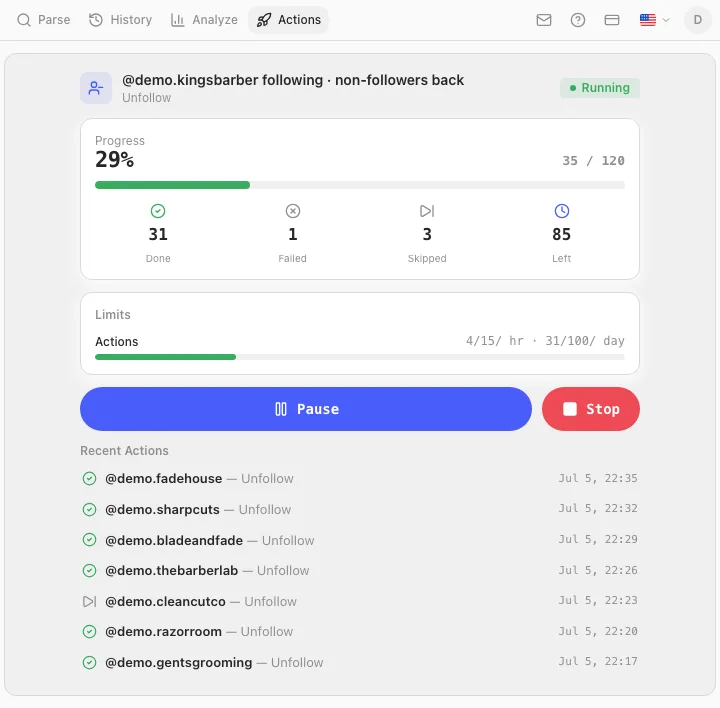
Le dernier écran récapitule tout le travail : combien de comptes, à quel rythme, sur quelle durée approximative. Lancez-le, et la file tourne en arrière-plan de l'onglet Instagram — qui doit rester ouvert, parce que c'est là que vit le moteur. La progression est enregistrée au fil de l'eau, donc fermer Chrome met l'exécution en pause au lieu de la perdre.
À quelle vitesse c'est trop vite
Il n'existe aucun chiffre officiel — Instagram n'en publie aucun, et quiconque cite des limites exactes cite des mesures communautaires. Ce que la communauté rapporte régulièrement pour les retraits s'aligne sur les autres types d'actions : environ 100 à 150 par jour sur un compte établi, bien moins de 50 sur un compte jeune, et un plafond horaire qui mord avant le plafond quotidien. Le tableau complet, y compris à quoi ressemble un action block et combien de temps il dure, est dans les limites d'abonnement d'Instagram.
Deux choses propres aux retraits méritent d'être connues. Votre nombre d'abonnés baisse visiblement pendant que la file tourne, ce qui est attendu et parfois alarmant si vous aviez oublié l'avoir lancée. Et un retrait est réellement irréversible de votre côté : vous ne pouvez pas réintégrer quelqu'un, seulement attendre qu'il vous suive à nouveau. Exportez la liste d'abonnés avant de commencer — un CSV daté est la seule trace que vous aurez de qui était là.
Questions fréquentes
Instagram prévient-il quelqu'un quand on le retire de ses abonnés ?
Non. Il n'y a aucune notification d'aucune sorte. La personne ne le découvre que si elle va voir — elle ne verra plus vos publications dans son fil, et votre profil affichera de nouveau un bouton « Suivre » au lieu de « Abonné ». Les comptes qui surveillent leurs propres nombres de près le remarquent parfois ; la plupart des gens, jamais.
Puis-je retirer tous mes abonnés d'un coup ?
Pas en une action, et aucun outil ne peut honnêtement le proposer. Le bouton intégré d'Instagram traite un compte à la fois, et tout ce qui l'automatise effectue quand même un retrait par compte, contre les mêmes limites de débit. Une file rend la chose autonome, pas instantanée : au rythme Safe, 1 500 retraits représentent environ sept semaines, et en Fast, dix jours.
Retirer un abonné, est-ce la même chose que le bloquer ?
Non. Retirer coupe l'abonnement et rien d'autre — la personne peut toujours trouver et consulter un profil public, et se réabonner. Bloquer vous masque entièrement à ses yeux et saute immédiatement aux yeux. Pour faire le ménage dans une audience, retirer est le bon outil ; bloquer, c'est pour des individus.
Retirer des abonnés va-t-il nuire à ma portée ?
Retirer des abonnés engagés, oui. Retirer des comptes dormants aide généralement, parce que le signal de distribution initiale d'Instagram est la réaction de la première tranche de votre audience, et que les comptes morts ne réagissent à rien. Le mode d'échec, c'est le sur-filtrage : des règles agressives emportent de vraies personnes aux profils clairsemés, ce que l'onglet Review existe précisément pour rattraper.
Puis-je être banni pour avoir retiré des abonnés en masse ?
L'action est ordinaire ; c'est le rythme qui se fait repérer. Les retraits comptent dans les mêmes limites d'actions que les abonnements et les désabonnements, et quelques centaines en une heure ressemblent à de l'automatisation parce que c'en est. Rester dans le rythme Safe ou Optimal, avec des intervalles randomisés et des pauses imposées, maintient une purge dans la plage d'un usage normal — mais aucun outil ne peut vous promettre un résultat, et l'activité automatisée va à l'encontre des conditions d'Instagram, quel que soit le rythme.
Comment savoir quels abonnés sont des bots ?
Vous ne le savez pas avec certitude — vous travaillez à partir de signaux. Pas de photo de profil, pas de publications, une bio faite d'émojis ou vide, un nombre d'abonnements dans les milliers face à une poignée d'abonnés, un identifiant à longue queue numérique. Deep Parse recueille ces champs pour que les filtres d'audience puissent agir dessus, et un groupe de comptes tous arrivés le même jour et tous semblables est le signal le plus fort du lot.
Puis-je annuler un retrait en masse ?
Non. Vous ne pouvez pas réintégrer un abonné — lui seul peut vous suivre à nouveau. Cette asymétrie est l'argument qui justifie d'exporter la liste d'abord et de mener la purge par lots plutôt que d'un seul bloc.
Note sur les conditions d'utilisation : les actions automatisées — y compris le retrait automatisé d'abonnés — vont à l'encontre des conditions d'utilisation d'Instagram, quel que soit l'outil qui les exécute. Le rythme et les plafonds réduisent le risque de blocage ; ils ne changent pas les règles. Gramlens n'est pas affilié à Instagram ni à Meta.
En bref. Le bouton « Retirer cet abonné » d'Instagram agit sur un compte à la fois, ce qui convient pour une personne et ne sert à rien pour un nettoyage. Parsez vos abonnés, passez-les au Deep Parse pour donner de la matière aux filtres, puis lancez Actions → Manage → Remove Followers avec l'audience resserrée et l'onglet Review réellement révisé. Restez au rythme Safe ou Optimal, exportez la liste d'abord parce que le retrait est à sens unique, et rappelez-vous qu'une purge répare une audience morte — elle ne répare pas un contenu qui ne prend pas.
À lire ensuite
Découvrir la fonctionnalité