
Comment voir qui ne vous suit pas en retour sur Instagram
Instagram n'a pas de liste des non-abonnés : elle se construit en comparant abonnements et abonnés. Méthode manuelle, méthode automatique, et après.
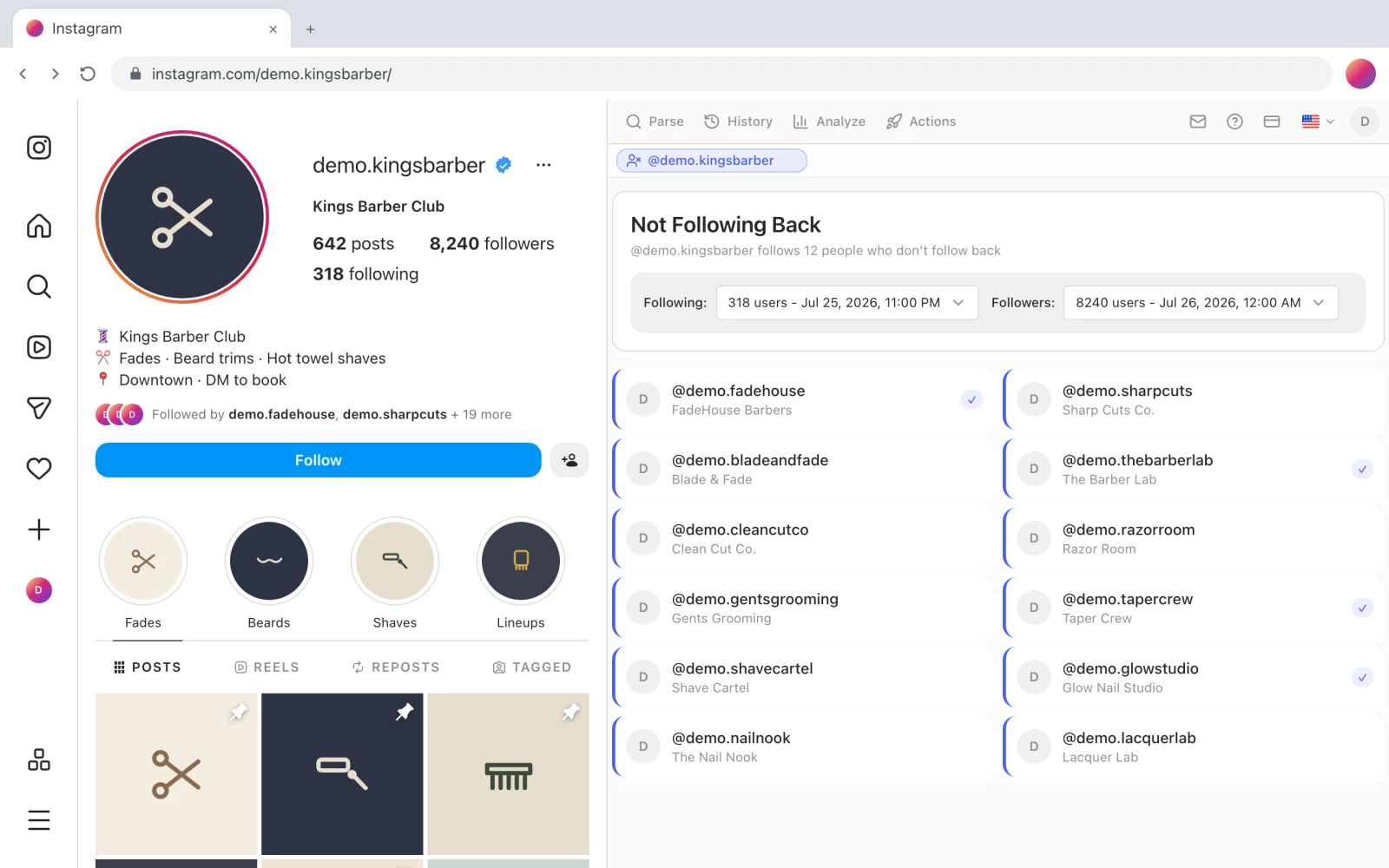
Vous suivez 318 comptes. 8 240 vous suivent. Quelque part dans ce premier nombre se cache un ensemble de comptes qui ne vous ont jamais suivi en retour — la boutique que vous avez identifiée une fois, les douze personnes suivies pendant une poussée de croissance en mars, un ancien collaborateur qui a discrètement fait le ménage. Instagram sait exactement qui ils sont et ne vous montrera jamais la liste.
Il ne le fera pas, parce que cette liste n'existe que comme la différence entre deux autres listes, et l'application ne vous donne aucun moyen de soustraire l'une de l'autre. Ce guide couvre les trois façons de l'obtenir quand même : à la main pour un petit compte, avec l'export de données d'Instagram et un tableur, et automatiquement avec une extension Chrome qui fait le recoupement dans votre navigateur. Il couvre aussi la partie que la plupart des guides sautent — ce qui se passe quand vous agissez sur la liste, car c'est là que les comptes se font vraiment restreindre.
Non-abonnés et désabonnés sont deux listes différentes
On cherche l'un pour l'autre indifféremment alors que ce n'est pas la même chose, donc dix secondes de précision valent le détour avant de choisir un outil.
Les non-abonnés sont les comptes que vous suivez et qui ne vous suivent pas en retour. C'est une comparaison statique : votre liste d'abonnements moins votre liste d'abonnés, maintenant. Peu importe qu'ils ne vous aient jamais suivi ou qu'ils vous aient suivi pendant un an avant de partir — s'ils ne vous suivent pas à cet instant, ils sont sur la liste. Vous pouvez répondre à cette question cinq minutes après avoir installé quoi que ce soit, parce que les deux listes existent aujourd'hui.
Les désabonnés sont les comptes qui vous suivaient et qui ont arrêté. Ça, c'est une différence dans le temps, et il faut un historique : deux instantanés de votre liste d'abonnés à des dates différentes. Aucun outil ne peut vous dire qui s'est désabonné le mois dernier si rien n'a enregistré votre liste le mois dernier — ce versant du problème est traité dans comment voir qui s'est désabonné de vous sur Instagram.
Le recouvrement est réel mais partiel. Quelqu'un qui s'est désabonné la semaine dernière est aussi un non-abonné aujourd'hui, si vous le suivez toujours. Quelqu'un qui ne vous a jamais suivi est un non-abonné et n'apparaîtra jamais dans un rapport de désabonnements. La plupart des gens qui cherchent l'un veulent en fait les deux, et c'est pour ça qu'ils vivent au même endroit dans Gramlens — mais si vous n'en voulez qu'un, la liste des non-abonnés est celle que vous pouvez avoir tout de suite.
Pourquoi Instagram la cache
Il n'y a pas d'écran « non-abonnés » et il n'y en a jamais eu. La lecture généreuse, c'est qu'une liste du type « qui vous ignore » est une fonctionnalité qui fait se sentir moins bien et ouvrir l'application moins souvent. La lecture pratique, c'est que les taux de retour d'abonnement sont la matière première des jeux de croissance follow/unfollow, et qu'une liste intégrée les industrialiserait.
Dans les deux cas la conséquence pour vous est la même : tout outil qui répond à cette question le fait en comparant vos deux listes. Il n'y a pas de point d'accès caché, pas de données secrètes. Ce qui diffère d'un outil à l'autre, c'est où tourne la comparaison et ce qu'ils ont demandé pour pouvoir la faire tourner — ce qui se révèle être la seule question qui vaille au moment d'en choisir un.
La méthode manuelle : elle marche, jusqu'à un certain point
Si vous suivez moins d'une centaine de comptes, faites-le dans l'application et sautez le reste de cette section. Ouvrez votre liste d'abonnements, entrez dans chaque profil, et cherchez le badge « Vous suit » sous l'identifiant. C'est fastidieux et parfaitement fiable.
Au-delà de cent, ça cesse de passer à l'échelle — et au-delà de quelques centaines, ça cesse d'être une tâche qu'un être humain termine. L'échelon suivant, c'est l'export de données d'Instagram lui-même :
- Demandez vos données. Dans l'application : Paramètres → Espace Comptes → Vos informations et autorisations → Télécharger vos informations. Choisissez JSON, et limitez l'export aux abonnés et abonnements pour garder l'archive légère.
- Attendez. La livraison prend de quelques minutes à 48 heures, envoyée par e-mail sous forme de lien de téléchargement.
- Ouvrez les deux fichiers. L'archive contient
followers_1.jsonetfollowing.json. Ce sont deux listes d'identifiants enveloppées dans une bonne dose de métadonnées. - Soustrayez l'une de l'autre. Collez les deux dans un tableur, un identifiant par ligne, les abonnements en colonne A et les abonnés en colonne B. En colonne C :
=SI(NB.SI(B:B; A2)=0; "ne suit pas en retour"; ""). Chaque ligne signalée est un non-abonné.
C'est gratuit, ça n'implique aucun tiers, et c'est la bonne réponse s'il vous faut la liste une seule fois. Ses deux coûts sont l'attente et le fait que l'archive est un instantané du moment où Instagram l'a construite — le temps qu'elle arrive, elle a déjà un jour ou deux de retard. Faites-le tous les mois et vous ferez la danse de l'export tous les mois.
La méthode automatique : Not Following Back, étape par étape
L'extension Chrome Gramlens fait la même soustraction, sauf que les deux listes viennent de votre propre session de navigateur au lieu d'une demande de données, et que la comparaison prend une seconde au lieu d'un tableur. Vous ne tapez jamais votre mot de passe Instagram ailleurs que sur instagram.com — l'extension lit ce que l'onglet où vous êtes déjà connecté peut déjà voir.
Il y a une chose à comprendre avant de commencer, parce qu'elle explique tout le déroulé : la comparaison lit des listes que vous avez parsées, pas Instagram directement. Les deux premières étapes consistent donc à créer ces listes.
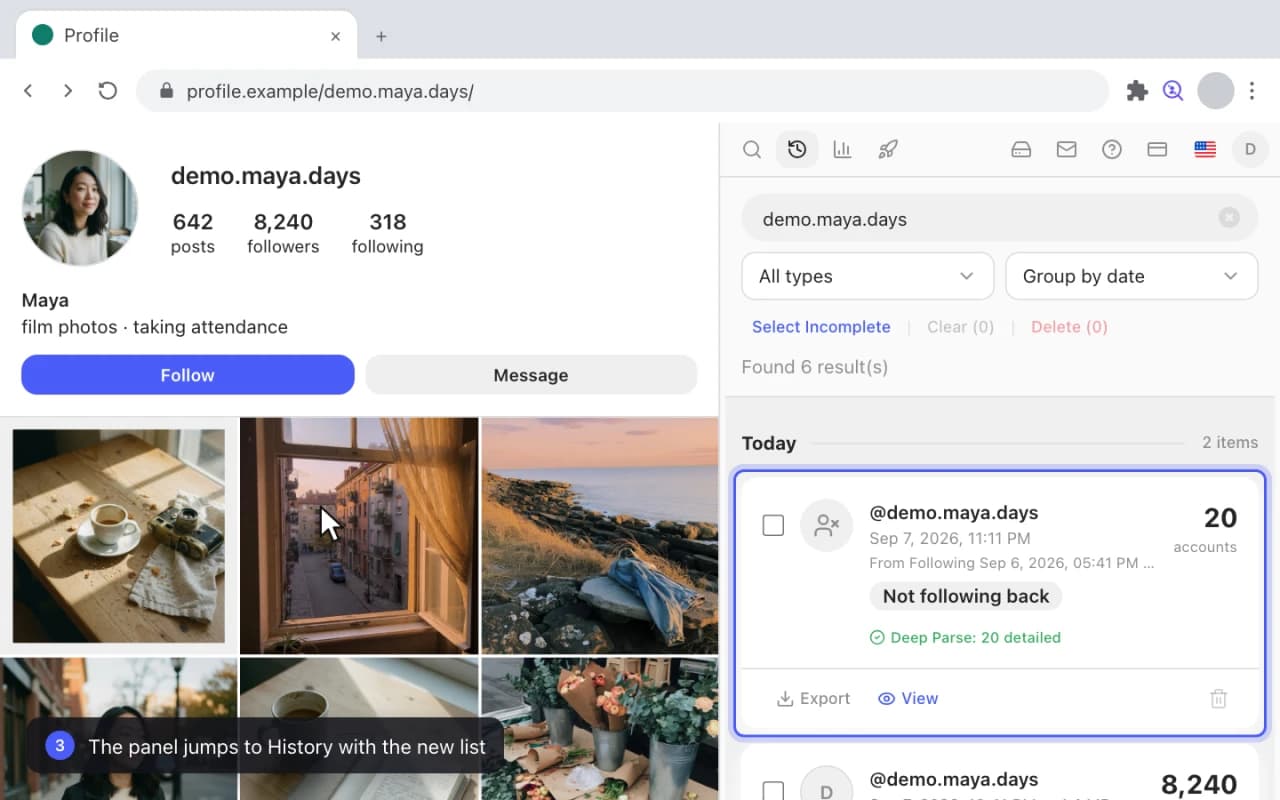
1. Parsez votre liste d'abonnements
Ouvrez votre propre profil sur instagram.com et cliquez sur l'icône Gramlens. Le panneau latéral détecte le profil et affiche vos nombres d'abonnés et d'abonnements. Dans Parse Mode (mode de parsing), choisissez Following (abonnements) et lancez l'exécution. Quelques centaines de comptes prennent bien moins d'une minute ; gardez l'onglet ouvert pendant le travail.
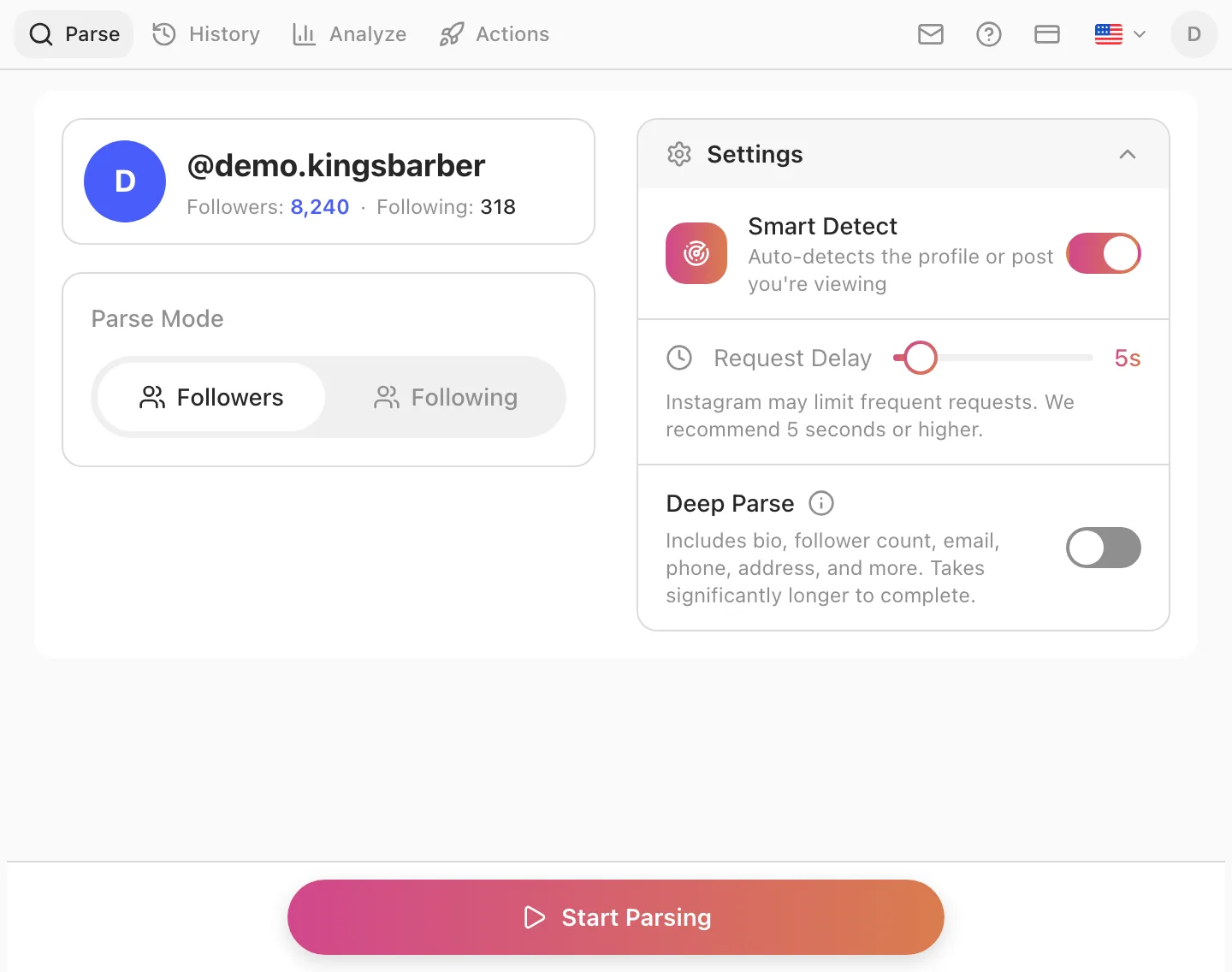
2. Parsez vos abonnés
Basculez Parse Mode sur Followers (abonnés) et relancez sur le même profil. Les deux côtés existent désormais comme instantanés datés. Sur un gros compte, c'est l'étape lente — 8 000 abonnés prennent quelques minutes — mais elle n'a lieu qu'une fois par actualisation, et toutes les autres vues de l'extension réutilisent ces mêmes instantanés.
Si vous voulez le détail de ce que produit un parsing et des champs qui l'accompagnent, comment exporter votre liste d'abonnements Instagram parcourt la même exécution de bout en bout, sortie CSV, Excel et JSON comprise.
3. Ouvrez Analyze → Not Following Back
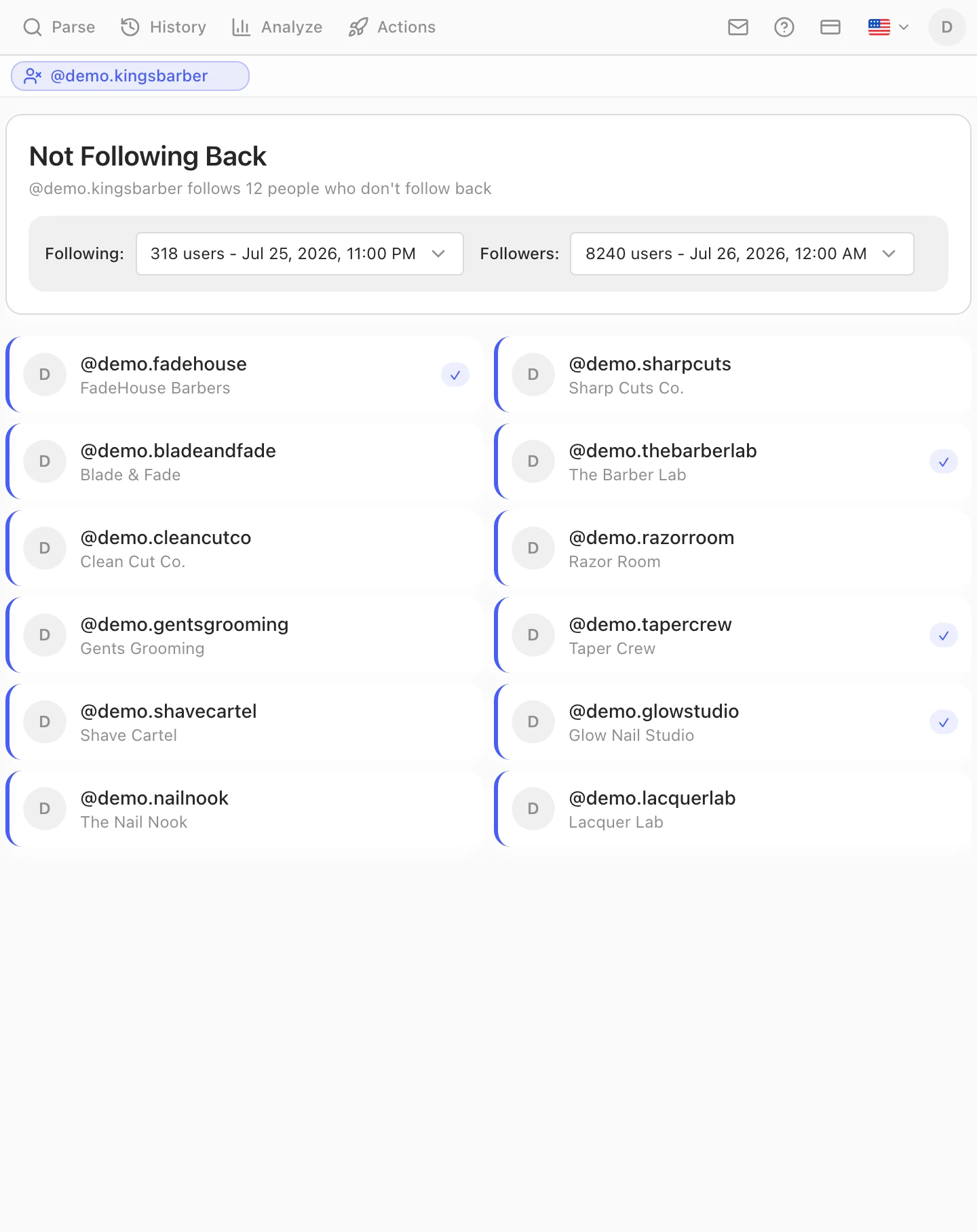
Allez dans l'onglet Analyze, choisissez votre compte, et sélectionnez la vue Not Following Back (ne suivent pas en retour). Elle trouve l'instantané le plus récent de chaque type, les recoupe, et énonce la réponse en une ligne : @votreidentifiant suit 12 personnes qui ne le suivent pas en retour.
4. Choisissez les instantanés à comparer
Les deux menus déroulants au-dessus de la liste comptent plus qu'ils n'en ont l'air. Chacun sélectionne un instantané daté précis — abonnements à gauche, abonnés à droite — de sorte que vous comparez toujours deux points connus, et non quelque chose de flou étiqueté « maintenant ». Deux conséquences à connaître :
- Utilisez des instantanés de la même session pour une réponse propre. Comparer une liste d'abonnements de juin à une liste d'abonnés de juillet mesure un mois de dérive par-dessus la relation de non-abonnement.
- Vous pouvez délibérément comparer des dates différentes quand c'est ça la question. Vos abonnements d'aujourd'hui contre vos abonnés d'il y a trois mois vous disent qui a quitté le navire depuis.
Lire la liste avant d'agir dessus
Le réflexe, en voyant la liste, c'est de se désabonner de tout. Résistez cinq minutes, parce qu'un non-abonnement n'est pas un verdict et qu'une purge massive est le moyen le plus fiable qui soit de récolter un action block.
Beaucoup de non-abonnés sont légitimes. Les comptes que vous suivez pour l'information et non par réciprocité — actualités, marques chez qui vous achetez, un artiste dont vous aimez le travail, un concurrent que vous gardez à l'œil — ne vous suivront jamais en retour, et c'est très bien ainsi. Si vous vous désabonnez sans discernement, vous effacez votre propre fil pour corriger un nombre que personne d'autre ne voit.
Un abonnement récent n'a pas eu le temps de répondre. Les gens consultent leurs demandes d'abonnement une fois par semaine, pas toutes les heures. Tout compte suivi le mois dernier ne prouve encore rien.
Cherchez le motif, pas l'individu. Un bloc de vingt comptes suivis le même jour de mars, dont aucun n'a réciproqué, c'est une expérience de croissance qui n'a pas marché — ça, c'est propre à défaire. Douze comptes sans rapport accumulés en deux ans, c'est simplement à quoi ressemble le fait de suivre des gens.
Le ratio vaut moins que ce qu'on en dit. Non, Instagram ne vous classe pas selon le rapport abonnés/abonnements. Ce qu'un ratio déséquilibré vous coûte vraiment, c'est un fil rempli de comptes qui ne vous intéressent pas — ce qui est un coût réel et un argument complètement différent.
Se désabonner de ceux que vous avez choisis — sans risque
Si c'est un vrai nettoyage que vous voulez, la contrainte est le rythme, pas le volume. Les limites d'Instagram réagissent à la vitesse à laquelle vous agissez, pas au nombre de comptes que vous finissez par traiter — et le désabonnement est l'action que ses systèmes surveillent de plus près, parce que le va-et-vient follow/unfollow est la signature classique du growth hacking. Le consensus de la communauté tourne autour de 100 à 150 désabonnements par jour pour un compte établi et bien moins de 50 pour un compte neuf, avec un plafond horaire qui compte davantage que le plafond quotidien. Les chiffres complets sont dans les limites d'abonnement d'Instagram.
À la main, ça fait une dizaine de désabonnements par heure avant que l'application commence à résister, et il faut rester là à le faire. Gramlens peut exécuter la même file en arrière-plan d'un onglet ouvert : enregistrez le résultat de Not Following Back comme liste, pointez Actions sur cette liste comme source d'audience, et seuls les comptes qui ne vous ont jamais suivi en retour entrent dans la file. L'étape Audience la resserre encore — par nombre d'abonnés, d'abonnements et de publications, par qualité du compte ou par mots-clés de la bio — et vous pouvez passer toute la liste en revue et en retirer des comptes précis avant que quoi que ce soit ne s'exécute.
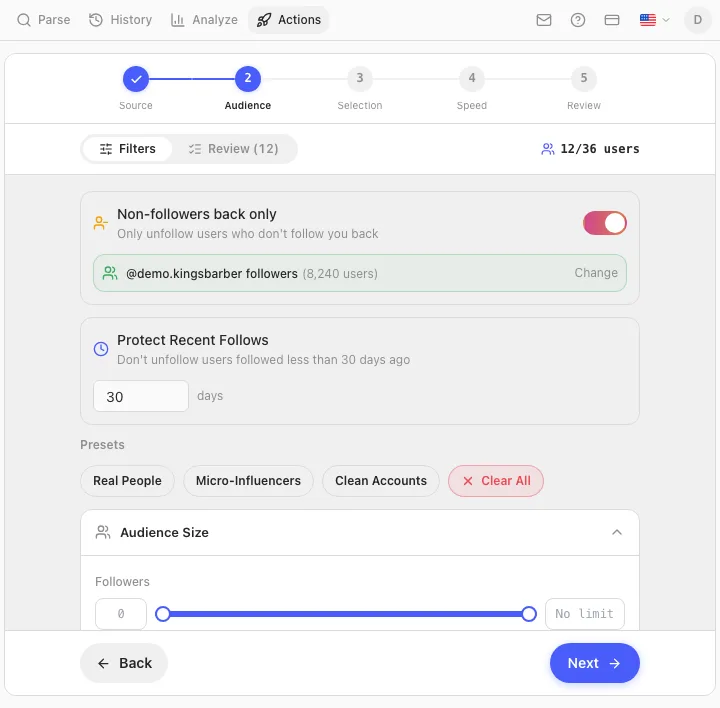
Le rythme, c'est ce qui garde le compte intact. Le mode Safe exécute 30 désabonnements par jour, les intervalles entre actions sont aléatoires et ne descendent jamais sous 20 secondes, il y a une pause de 15 à 25 minutes toutes les 60 à 80 actions, et la file s'arrête net, sans réessayer, dès la première fois qu'Instagram renvoie un challenge ou un action block. Le guide pas à pas du désabonnement en masse couvre tout l'assistant. Le désabonnement en masse est une fonctionnalité Pro ; trouver la liste, non.
Un conseil qui ne coûte rien et qui a épargné du vrai travail à bien des gens : exportez votre liste d'abonnements avant toute purge. Un CSV daté de qui vous suiviez est la seule annulation qu'Instagram vous accordera jamais.
Ce que ça coûte
Trouver la liste est gratuit dans le plan gratuit de Gramlens : 50 vues Analyze par mois, ce qui couvre Not Following Back, la chronologie des désabonnements et la comparaison de comptes. Le vrai plafond, c'est le parsing qui doit avoir lieu d'abord — le plan gratuit couvre 500 enregistrements par liste, ce qui suffit à auditer une liste d'abonnements de quelques centaines de comptes et la liste d'abonnés correspondante sur un petit compte. Les listes d'abonnés plus grandes demandent Plus, qui supprime le plafond. Se désabonner automatiquement de ce que vous trouvez fait partie de Pro.
Si vous voulez la fonctionnalité en profondeur plutôt que le mode d'emploi, la page du tracker de désabonnements couvre les trois vues Analyze et ce dont chacune a besoin.
Questions fréquentes
Instagram a-t-il une liste des gens qui ne me suivent pas en retour ?
Non. Il n'y a pas d'écran « non-abonnés » dans l'application et aucune API qui en renvoie une. Le seul signal qu'Instagram vous donne est le badge « Vous suit » sur un profil individuel, ce qui revient à vérifier les comptes un par un. Tout outil qui produit la liste complète la construit en comparant vos abonnements à vos abonnés.
Puis-je voir gratuitement qui ne me suit pas en retour ?
Oui, de trois façons. Manuellement, en cherchant le badge « Vous suit » sur les profils — praticable jusqu'à une centaine de comptes. Avec le téléchargement de données d'Instagram et une formule de tableur, ce qui ne coûte rien sinon une attente pouvant aller jusqu'à 48 heures. Ou avec le plan gratuit de Gramlens, qui inclut 50 vues Analyze par mois et le parsing de jusqu'à 500 enregistrements par liste.
Les gens sauront-ils que j'ai vérifié, ou que je me suis désabonné ?
Vérifier est invisible — lire vos propres listes ne produit aucune notification. Le désabonnement n'est pas notifié non plus : Instagram ne dit jamais à quelqu'un que vous vous êtes désabonné. Il peut le découvrir en regardant, et les comptes qui surveillent leur nombre d'abonnés de près le font souvent, mais rien ne lui est envoyé.
Est-ce sans risque de se désabonner de tous ceux qui ne me suivent pas en retour ?
Sans risque sur le principe, risqué dans l'exécution. L'action en elle-même est ordinaire ; en faire plusieurs centaines en une heure, voilà ce qui déclenche un blocage. Restez sous environ 100 à 150 par jour sur un compte établi, gardez le rythme horaire bas, et étalez. Ça vaut aussi la peine de se demander si vous le voulez vraiment — les comptes que vous suivez pour l'information n'allaient jamais réciproquer.
Pourquoi les nombres ne correspondent-ils pas à ceux de mon profil ?
Parce qu'un instantané est un moment, pas un flux en direct. Si votre profil affiche 318 abonnements et l'instantané 312, six comptes ont changé depuis le parsing, ou l'exécution a été plafonnée par une limite du plan avant d'aboutir. Relancez le parsing et les deux se rejoignent. Les comptes désactivés et supprimés dérivent aussi hors des listes à leur propre rythme.
Puis-je vérifier qui ne suit pas en retour sur le compte de quelqu'un d'autre ?
Vous pouvez comparer deux listes que votre propre session peut ouvrir, donc oui pour les comptes publics : parsez leurs abonnés et leurs abonnements, et la même vue vous dira quels comptes ils suivent sans réciprocité. Les comptes privés que vous ne suivez pas ne sont pas lisibles — l'extension voit exactement ce que vous voyez.
Est-ce que ça marche sur mobile ?
Non. Gramlens est une extension Chrome pour ordinateur, et le parsing tourne dans un onglet de navigateur ouvert. Il n'y a pas d'application iOS ou Android. Les applications mobiles qui comblent ce vide sont massivement du genre à réclamer votre identifiant Instagram, ce qui est un marché nettement moins bon que d'attendre d'être devant un ordinateur.
Note sur les conditions d'utilisation : les actions automatisées — y compris le désabonnement automatisé — vont à l'encontre des conditions d'utilisation d'Instagram, quel que soit l'outil qui les exécute. Le rythme et les plafonds réduisent le risque de blocage ; ils ne changent pas les règles. Lire ses propres listes n'est pas de l'automatisation. Gramlens n'est pas affilié à Instagram ni à Meta.
En bref. Instagram n'a pas de liste des non-abonnés parce que cette liste est une soustraction qu'il refuse de faire pour vous : vos abonnements moins vos abonnés. Parsez les deux avec Gramlens, ouvrez Analyze → Not Following Back, et la réponse tient en une ligne et une liste — gratuitement, et sans qu'un mot de passe quitte instagram.com. Ensuite, réfléchissez avant de purger : certains non-abonnés ont leur place, et se désabonner des autres est un travail de file cadencée, pas d'un après-midi à tapoter.
À lire ensuite
Découvrir la fonctionnalité