
Chrome extension · Your data stays on your computer · No password
Compare two Instagram accounts and see the audience they share
Put any two profiles side by side and get three lists: the followers only they have, the followers only you have, and everyone in both. Built from lists you parsed yourself, in your own browser.
Included in the 50 free Analyze views a month. No Instagram password, ever.
Follower counts do not tell you who
Two accounts with 8,000 followers each can share nearly all of them or almost none, and the number on the profile reads identically either way.
Instagram gives you one hint — the Followed by … and 19 others line on a profile — and then stops. There is no way in the app to ask which of your followers also follow someone else, or which of theirs have never seen you.
Both answers come from the same operation: take two follower lists as data and intersect them. Gramlens does it locally on snapshots you have already parsed, which is why either side can be a followers list or a following list. Comparing your following list against a competitor's followers is a different and often more useful question than followers-versus-followers.
Three lists, one screen
Each side picks its own account, its own list type and its own snapshot date.
tour-compare.webp
The Gramlens account comparison next to an Instagram profile: two account cards with list-type and snapshot-date pickers, and three counted tabs — only the first account, follow both, only the second.
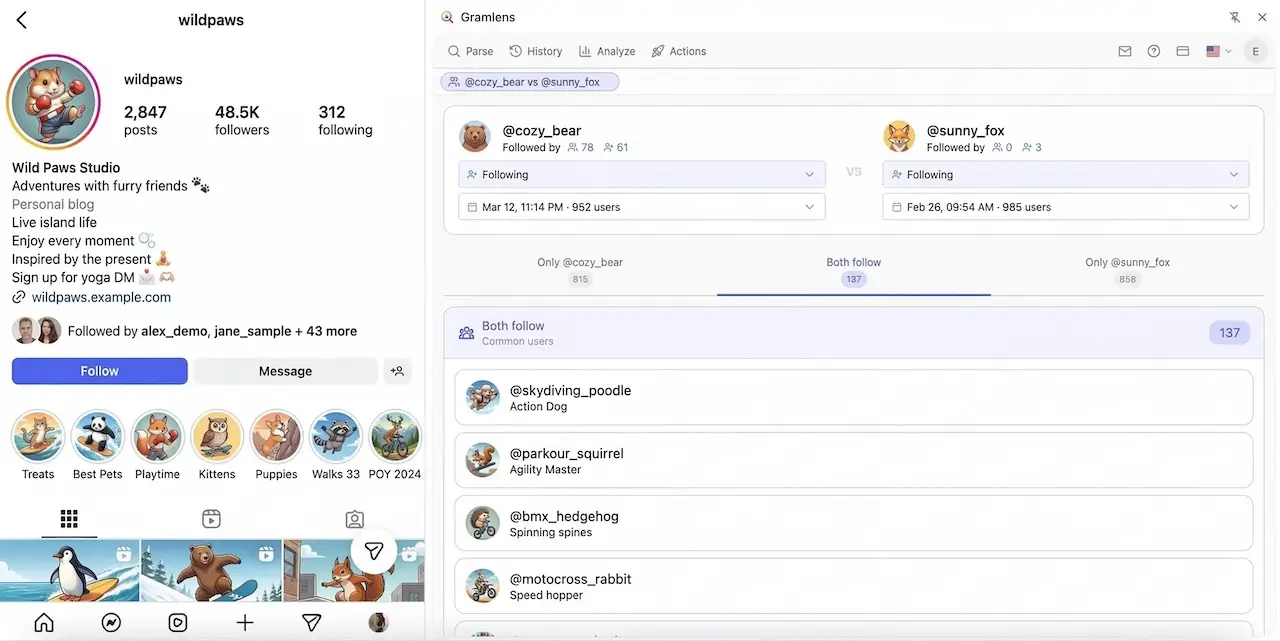
Only the first account
Their audience minus yours. The prospect list — people in the niche who have never encountered you.
Follow both
The shared audience. How much of a collaboration's reach you are already paying for.
Only the second account
Yours alone. What you bring to a swap, and what a competitor has not reached yet.
How it works
Comparison reads saved snapshots, so both accounts have to be parsed before there is anything to compare.
Parse the first account
Open the profile on instagram.com, choose followers or following in the side panel and let it run. The result is saved as a dated snapshot.
Parse the second
Same thing on the other profile. Public accounts work, and private ones only if you already follow them — the extension sees exactly what your session sees.
Open Analyze and compare
Pick both accounts, pick the list type and snapshot for each side, and read the three tabs. Nothing touches Instagram at this point.
What people use it for
The overlap number is rarely the deliverable. What you do with the three lists is.
Vet an influencer
If most of their followers already follow you, a paid collaboration buys reach you have. Check before the invoice, not after.
Size up a competitor
The accounts following them but not you are a named list of people already interested in the category.
Plan a cross-promotion
Low overlap is what makes a shoutout swap worth doing. High overlap means you would be talking to the same room twice.
The limits, up front
- Both accounts must be parsed first. Comparison reads your own saved snapshots — it does not query Instagram live, and an account you have never parsed will not appear in the picker.
- Only lists your session can already open. Public accounts, and private accounts you follow. Privacy settings are not bypassed.
- The free 500-record parsing cap is the ceiling on Free, and a paid plan removes it. Instagram's own ceiling stays either way: a run stops at roughly 8,000 profiles and list loading can then pause for about a day, so two accounts of that size are best parsed on separate days. The comparison view itself is one of the 50 free monthly Analyze views.
- A snapshot is a point in time. Comparing a January list against a July one measures both the overlap and seven months of drift — pick dates close together when that matters.
- Overlap is not endorsement. Shared followers say two audiences touch, not that either account is worth collaborating with.
From analysis to a campaign
The list of accounts that follow a competitor but not you is the most actionable output here, and it is also the one most likely to get an account restricted if you rush it. Gramlens can take that list into the Actions queue and follow, like or comment through it at a human pace — randomised gaps with a 20-second floor, breaks every few dozen actions, and a hard stop the first time Instagram returns a challenge.
Follow and like in Safe mode are on every plan. Comments, keyword targeting, the faster presets and the audience filters are Pro. Or skip automation entirely and export the list to CSV, Excel or JSON.
Frequently asked questions
See whose audience you actually share
Free to start, no card, no Instagram password.