
Chrome extension · Your data stays on your computer · No password
See who unfollowed you on Instagram and who never followed back
Instagram shows a follower count and nothing else. Gramlens turns your own saved snapshots into the three lists behind that number — non-followers, unfollowers by date, and the audience you share with another account.
Free plan covers 50 of these views a month. No Instagram password, ever.
Why Instagram will not just tell you
The follower count is the only signal the app gives you. There is no non-followers list, no unfollow notification, and no history — by design, because social scorekeeping is not a feature Instagram wants to ship.
You can reconstruct all of it yourself: open your following list, open your followers list, and compare the two by hand. For a few dozen accounts that works. Past a few hundred it stops being practical, and past a few thousand it is not a task a person finishes.
Every tool in this category solves it the same way — save the lists, then diff them. What differs is where your lists go and what the tool asked for to get them. The apps that want an Instagram login are storing your session on their servers; a browser extension reads what your already-logged-in tab can see and keeps the credentials where they were.
Three views, one Analyze tab
They all read snapshots you have already parsed, so nothing runs against Instagram while you look at them.
Not Following Back
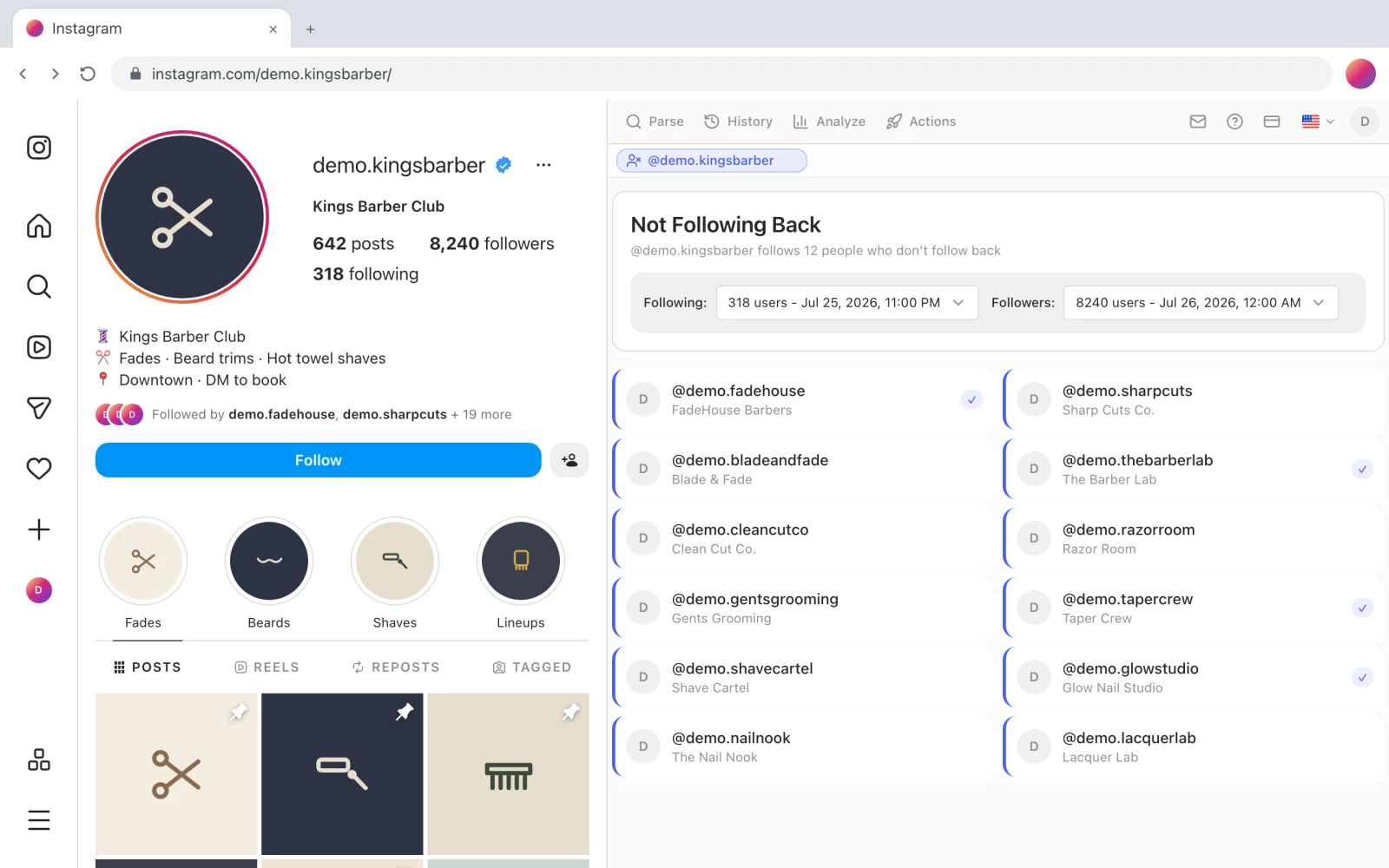
The accounts you follow that never followed you back, from cross-referencing your two lists.
Timeline
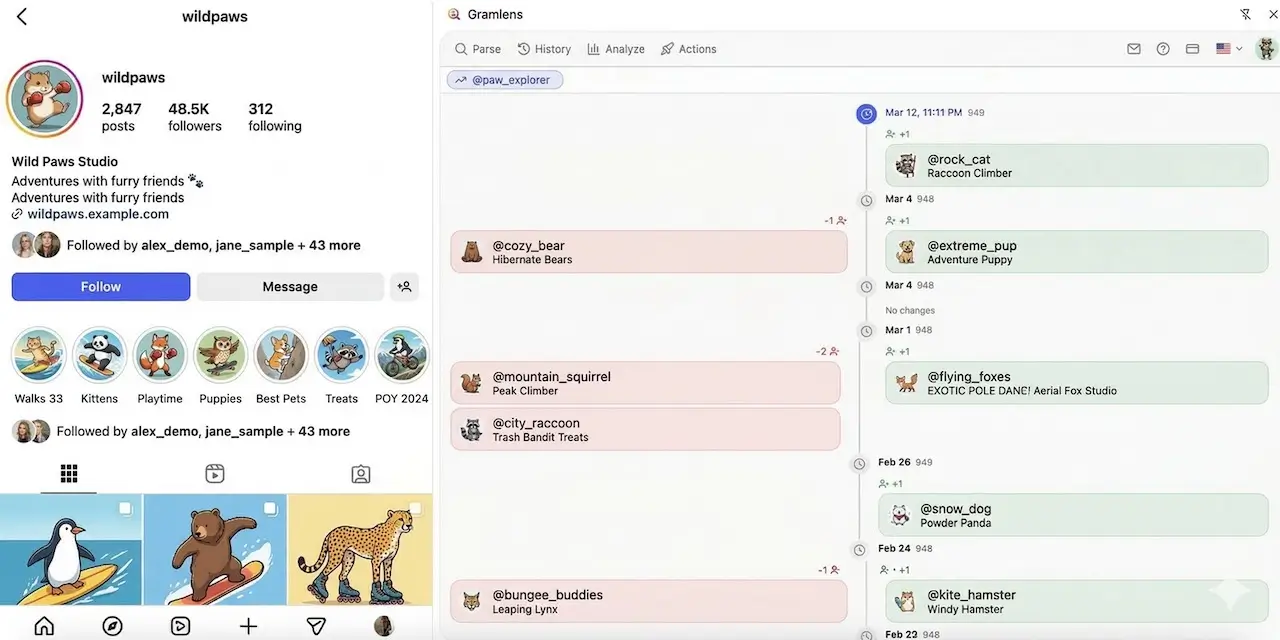
Snapshots diffed day by day: who unfollowed, who arrived, and on which date it happened.
Compare
Two accounts side by side — only theirs, only yours, and the followers you both have.
analyze-not-following-back.webp
The Gramlens Analyze tab with Not Following Back selected: the account picker, the followers and following snapshots being cross-referenced, the count of non-mutuals, and the resulting list of accounts.
tour-timeline.webp
The Gramlens analysis timeline next to an Instagram profile: dated groups with the follower total for each day, unfollowed accounts in the left column and new followers in the right.
How it works
Three steps, and the second one is the whole job — the lists have to exist before anything can be compared.
Install and open a profile
Add the extension, open instagram.com and the side panel appears next to the profile. You stay logged in as yourself; Gramlens never asks for a password.
Parse followers and following
Each parse saves a snapshot. Not Following Back needs both lists for the same account; the Timeline needs the same list parsed at least twice, days or weeks apart.
Open Analyze
Pick the account, pick the view. The result is a list you can read, search and export — or hand to the Unfollow queue.
No password, and no account on someone else's server
This is the part worth checking before you install anything in this category — including this.
Most "who unfollowed me" products are web apps or phone apps. To read your lists they need your Instagram session, so they ask you to log in on their site and keep that session running server-side. That is a working design, and it is also the reason the category has a reputation: a leaked session is an account takeover, and logins from an unfamiliar data centre are exactly what Instagram's risk systems flag.
Gramlens is a Chrome extension. It runs inside the tab you already have open, using the session that is already there, and reads only what that session can already see. There is no password field anywhere in the product. Snapshots stay in your own browser — they are never uploaded to our servers — and you can delete them whenever you want.
What this does not do
- It does not watch your account in the background. A snapshot is written when you parse a list, not on a schedule — so the Timeline is only as granular as how often you run it.
- It does not read private accounts you do not follow. If your own logged-in session cannot see a list, neither can the extension.
- It does not notify you the moment someone unfollows. You find out on the next parse, grouped by the date the change first appeared.
- Nothing here is guaranteed safe from Instagram's side. Reading your own lists is low risk; acting on them in bulk is not, which is why the Unfollow queue is paced and stops on the first block.
What it costs
The three Analyze views are free within a monthly allowance. Acting on what they find is the paid part.
| Plan | Analyze views | Parsing | Bulk unfollow |
|---|---|---|---|
| Free | 50 a month | Up to 500 records | — |
| Plus | Unlimited | Unlimited | — |
| Pro | Unlimited | Unlimited | Included |
Current prices are on the pricing section. A 500-record parse is enough to audit a small account end to end on the free plan; larger lists need Plus. Either way, one run brings back about 8,000 profiles, after which the platform may stop returning lists for about a day; everything collected is saved.
Then what — acting on the list
A list of non-followers is only useful if you do something with it, and that is where the account risk actually starts.
Gramlens can take the list straight into an Unfollow queue: point it at your following snapshot, switch on Non-followers back only with your followers snapshot as the cross-reference, and it will only queue accounts that never followed you back. Recently followed accounts can be protected by age, and every account in the queue can be reviewed and dropped by hand before anything runs.
The pacing is the point. Safe mode runs 30 unfollows a day, gaps are randomised and never fall below 20 seconds, there is a 15–25 minute break every 60–80 actions, and the queue hard-stops without retrying the moment Instagram returns a challenge or an action block. Bulk unfollow is a Pro feature.
Frequently asked questions
Find out who is actually following you back
Free to start, no card, no Instagram password.