
How to Extract Emails and Contacts from Instagram Followers
Turn any Instagram audience into a contact list with public emails, phones and websites — in your browser, without passwords, proxies or cloud scrapers.
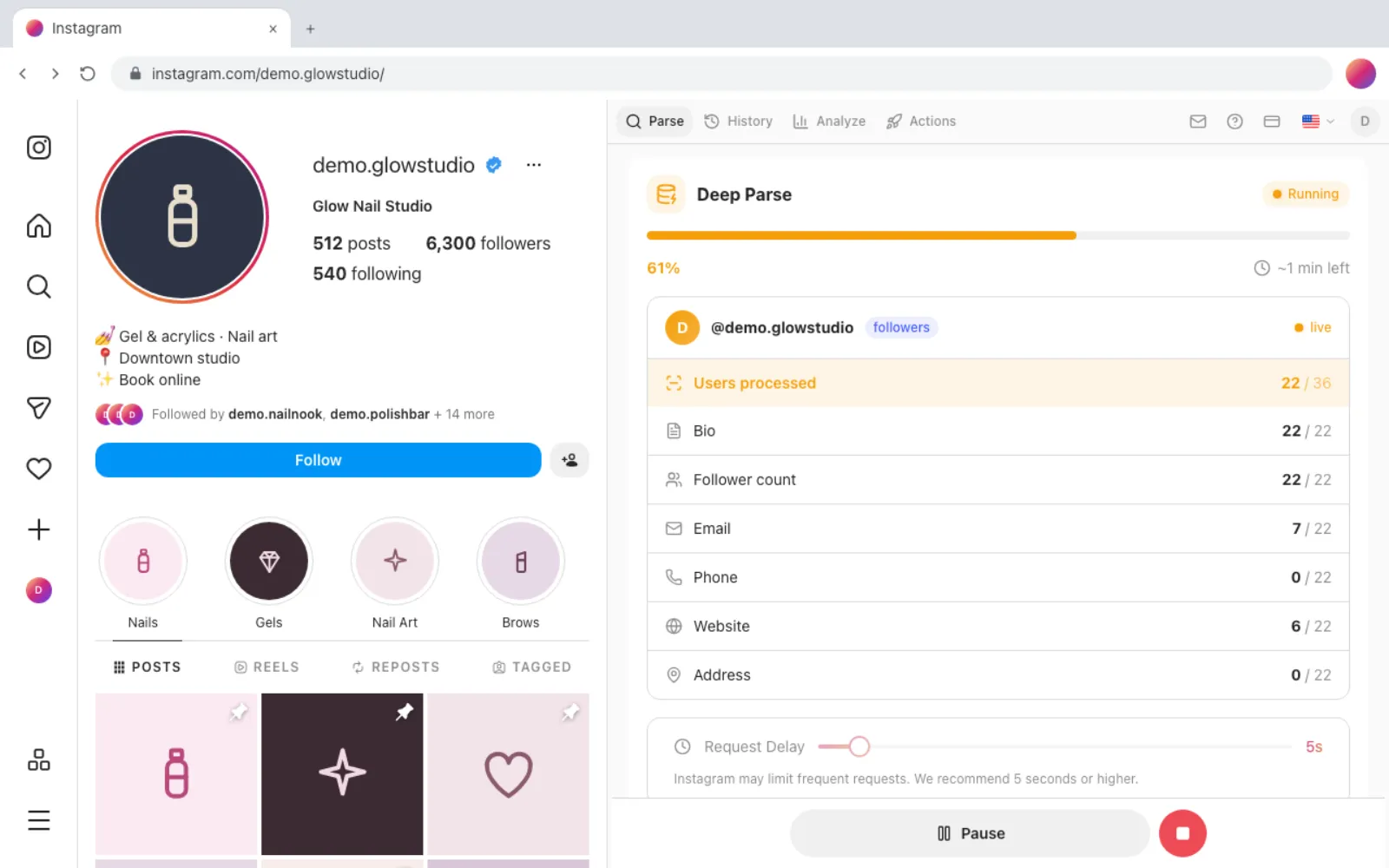
Search for an Instagram email scraper and every result promises the same thing: point it at an account, get back a spreadsheet of leads. What almost none of them tell you is where those emails actually come from — and that one fact decides whether you end up with a usable outreach list or a column of empty cells and a suspended account.
Here's the short version: Instagram only exposes contact details that account owners have chosen to publish on a business or creator profile. No tool on earth can extract an email that isn't there. What a good extractor does is visit each profile in an audience, collect the public contact info at scale, and hand it to you as a clean file — instead of you opening two thousand profiles by hand.
This guide shows how to do exactly that with Gramlens, a Chrome extension that runs in your own browser session: which followers will have an email and which never will, the step-by-step Deep Parse workflow, what the export contains, and how to use the result without crossing legal lines.
Where Instagram email scrapers actually get their data
Instagram profiles come in two flavors, and the difference is everything for email extraction:
- Personal accounts have no public contact fields at all. A personal account's email is known to Instagram, not to you — and no legitimate tool can retrieve it. Anything claiming otherwise is either guessing addresses or phishing.
- Business and creator accounts can publish contact options: a public email, a phone number, a website, a business category, and a city. That's the pool every honest Instagram email finder draws from — the same "Email" button you'd see visiting the profile yourself.
The practical consequence: your yield depends on who follows the account you're extracting from. An audience full of local services, shops, coaches, and creators converts well — a meaningful share are professional accounts with a public email. An audience of private meme-scrollers converts to almost nothing, no matter which tool you use.
As a rule of thumb from real runs: business-heavy niches often yield a public email on 15–30% of profiles. That sounds low until you do the math — 2,000 followers of a niche competitor can become 300–400 warm, relevant addresses tied to a real buyer signal. A generic purchased list can't compete with that.
Step-by-step: extract emails with Deep Parse
The workflow below uses Gramlens's Deep Parse mode — an enrichment pass that visits each profile in a parsed list and collects the public details. It runs entirely inside your Chrome tab, through your own logged-in Instagram session. You never hand your password to anyone, and the data lands on your disk, not on a third-party server. (If you haven't done a plain export before, the follower export walkthrough covers the basics in more detail.)
1. Open the profile and pick a list
Go to the Instagram profile whose audience you want — your own account, a competitor, a complementary brand — and click the Gramlens icon in the Chrome toolbar. The side panel detects the profile and shows the parse options. Choose Followers, or Following if you want the accounts a profile follows instead (that list has its own export guide).
2. Flip the Deep Parse toggle
In the parse settings, switch on Deep Parse. The description under the toggle is the honest contract: it adds bio, follower count, email, phone, address and more — and takes significantly longer, because it makes one extra request per profile.
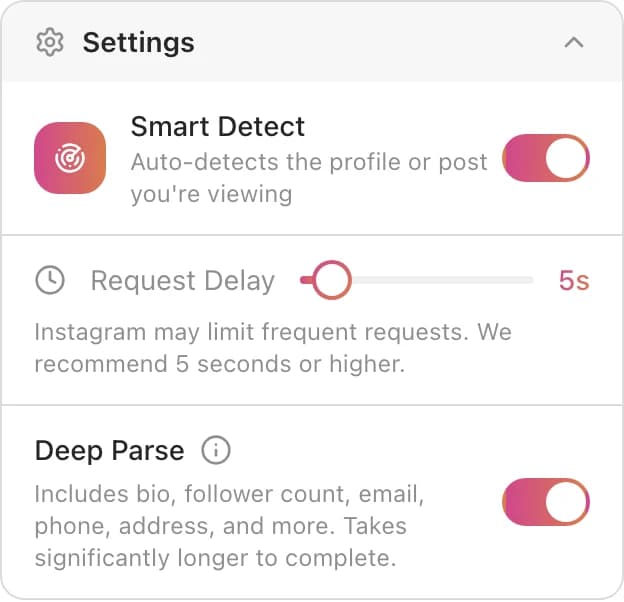
Leave the Request Delay at its conservative default. Deep Parse works profile by profile, and a polite pace is what keeps the run inside Instagram's rate limits — slower is safer, and the run doesn't need you watching it.
3. Start the run and let it work
Click Start Parsing. Gramlens first collects the list, then walks through each profile, and a live card shows exactly what it's finding: how many of the processed accounts had a public email, a phone, a website, an address.
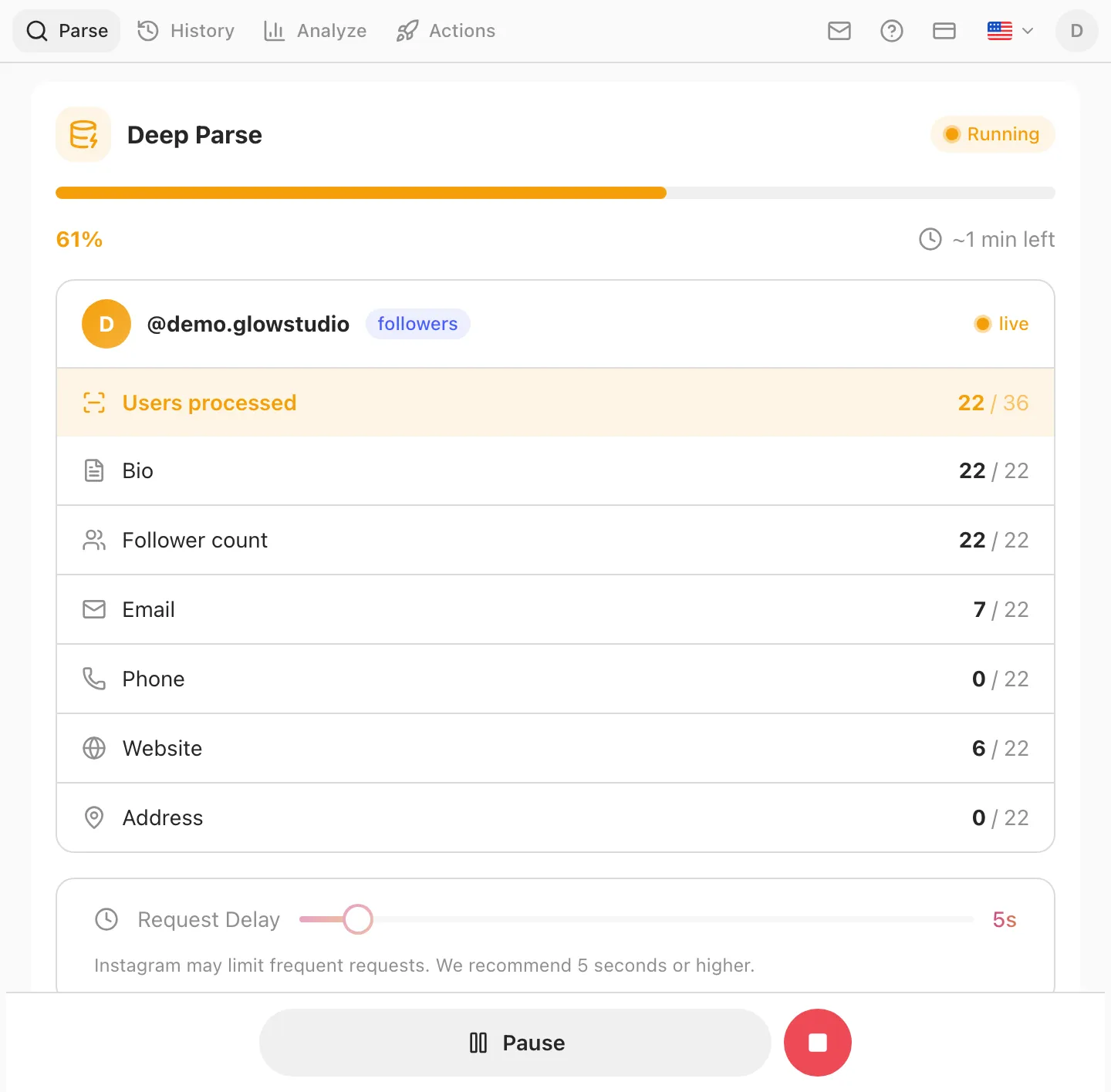
Time expectations, honestly: a 500-record run finishes in well under an hour; a 5,000-follower list is a leave-it-running-overnight job. Chrome has to stay open (minimised is fine), the laptop awake. And if you already exported a list earlier without enrichment, you don't need to re-parse — open History and click Deep Parse on that result to enrich it after the fact.
4. Export with the contact columns
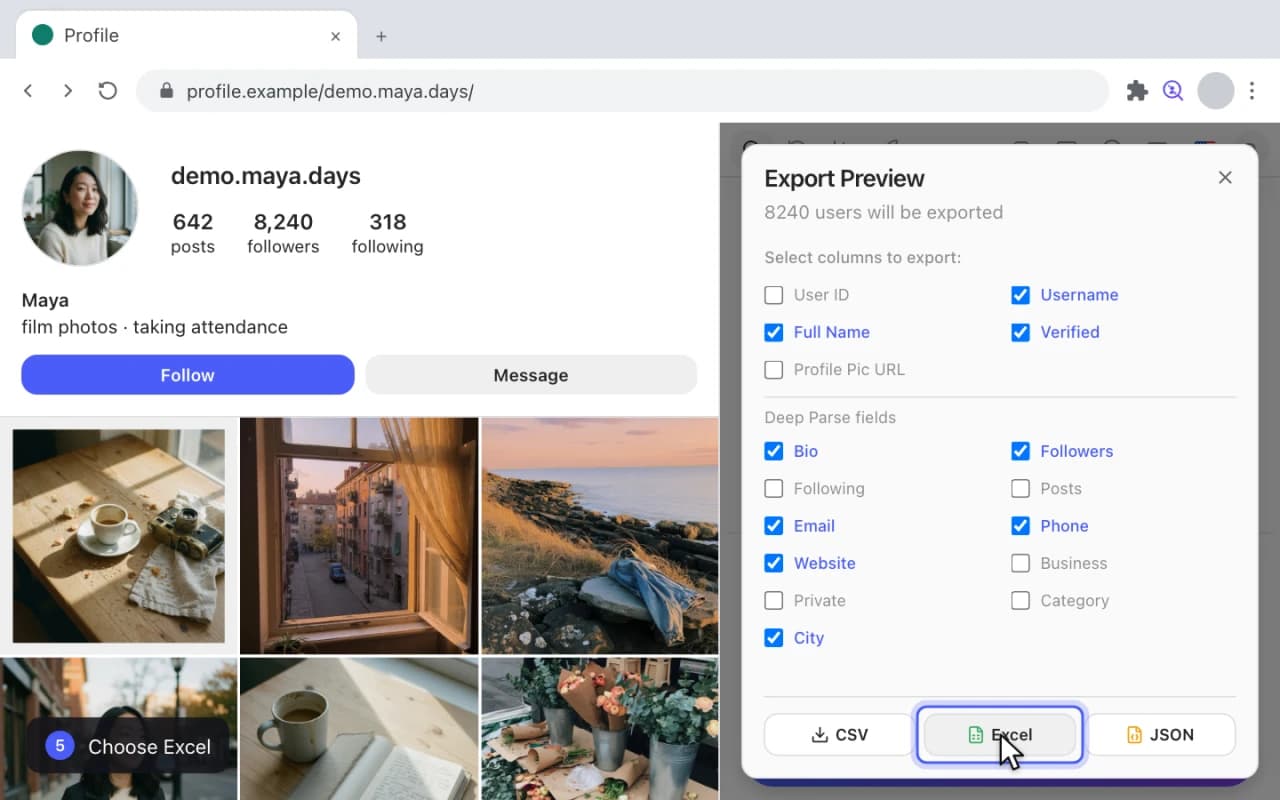
When the run finishes, click Export. Alongside the basic columns, the preview now shows a Deep Parse fields section — tick Email, Phone, and Website, plus whatever else you need, and download as CSV, Excel, or JSON.
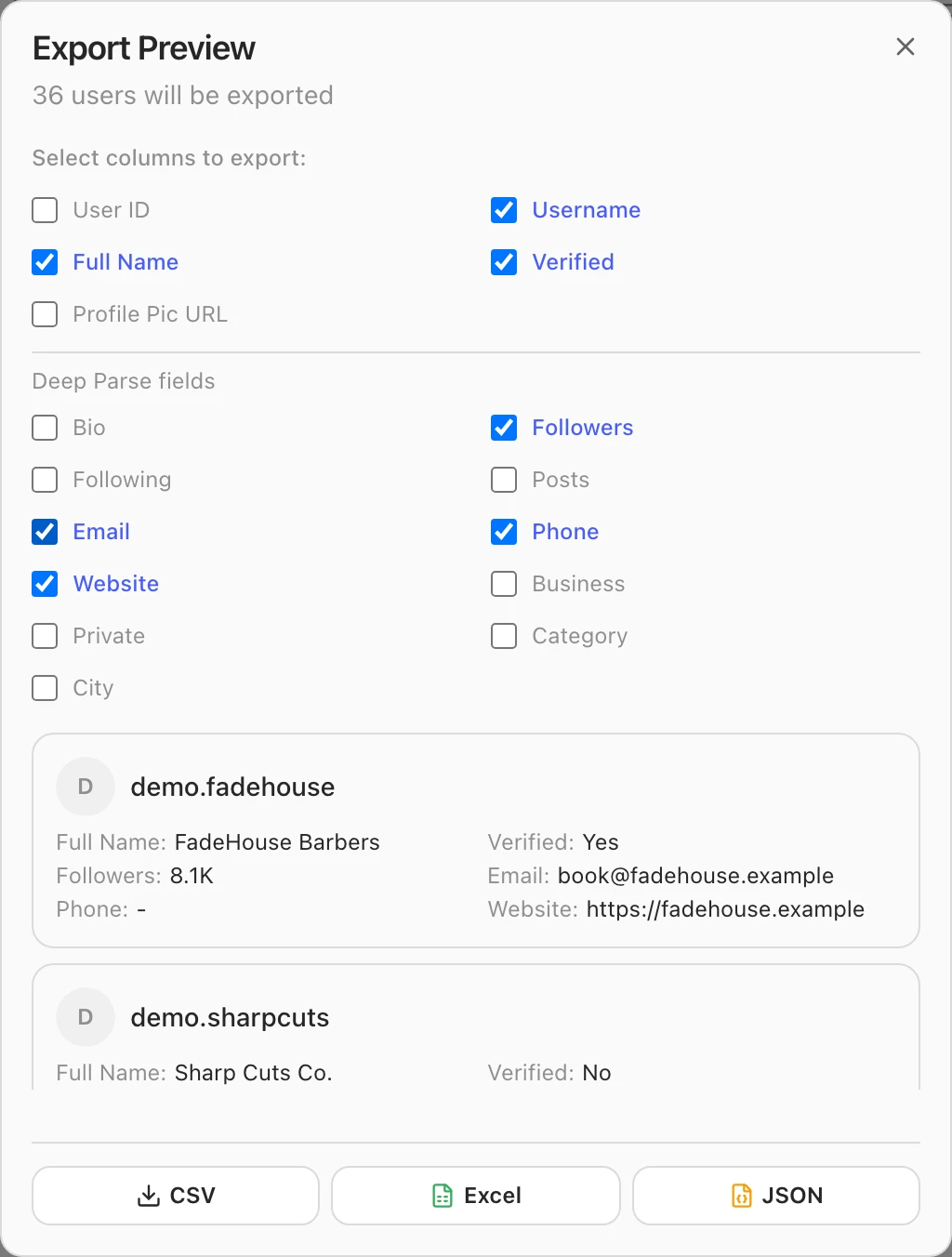
Note the second preview row: no email, and that's not a bug. Personal accounts and businesses that chose not to publish contact info export with an empty cell — you filter them out in the next step.
What's in the export
The enriched file contains everything a plain export has, plus the Deep Parse fields:
- Identity: username, full name, profile URL, and the numeric User ID — tick it if you'll de-duplicate against a CRM, because usernames change and IDs don't.
- Profile signals: bio text, follower / following / post counts, verified, private, business flags.
- Business details: category (say, "Barber shop" or "Coffee shop") and city.
- Contact: public email, public phone number, website link.
Every field is something the account owner published on their own profile. Deep Parse doesn't guess addresses, doesn't cross-reference data brokers, and doesn't see anything Instagram wouldn't show you in a normal browsing session.
From a raw export to an outreach list
A spreadsheet isn't a campaign. The ten minutes after the export are where the value gets made:
- Filter to rows with an email. Sort or filter the Email column; personal accounts drop out immediately.
- Segment by category and size. The business category column separates a nail studio from a fitness coach; follower counts separate peers from big brands. A message written for one segment beats a blast to all of them.
- Anchor the pitch in the source. These aren't random addresses — they follow a specific account in your niche. "We work with studios like yours" reads very differently when it's literally true.
- Keep volume boring. A few dozen well-aimed emails a day out of a warm segment outperforms a thousand-recipient blast that lands you on a blocklist.
Deep Parse is available on the Free plan for up to 500 records, and unlimited on Plus at $5.99/month — for context, cloud scraping platforms charge several times that for execution credits, while running in someone else's infrastructure with your session cookies.
And if your actual goal is Instagram-native outreach rather than email, consider skipping the inbox entirely: engaging the same filtered audience with follows and likes at a safe pace often converts better for local and B2B niches — that play has its own guide.
Compliance: the section most scraper guides skip
Extracting public data through your own browser session is the defensible end of this spectrum — it's the same information Instagram shows any logged-in visitor, collected politely. What you do with it is where the legal weight sits:
- GDPR (EU) and similar laws apply to storing and contacting people regardless of where the email came from. Business contact addresses used for relevant B2B outreach are the safest ground; bulk-mailing individuals in the EU without a lawful basis is a genuine risk. When in doubt, ask a lawyer before the campaign, not after.
- CAN-SPAM and its equivalents set the mechanics: identify yourself truthfully, no deceptive subject lines, include a working unsubscribe, honor it promptly.
- Practice data minimalism. Export the columns you'll use, delete lists you're done with, and honor removal requests — it's both the law in many places and simply how you'd want your own public email treated.
- Respect the source. Keep parsing volumes reasonable and delays conservative. Instagram's terms frown on aggressive automated collection, and your account is the one logged in — a polite pace is what keeps "enthusiastic browsing" from looking like abuse.
None of this is a reason to avoid email outreach — it's the difference between prospecting and spamming. The filter-and-segment work from the previous section isn't just good marketing; it's most of what compliance asks of you anyway.
Frequently asked questions
Can I get an email for every follower?
No — and no tool honestly can. Emails exist only for business and creator accounts that chose to publish a public contact. Expect a yield of roughly 15–30% in business-heavy audiences and much less in casual ones. The accounts without a public email simply export with an empty cell.
Is scraping emails from Instagram legal?
Collecting publicly visible data through your own authenticated session is generally analogous to reading the profiles yourself — it's not hacking and it bypasses no privacy control. The legal weight sits on usage: GDPR, CAN-SPAM, and similar laws govern how you store the data and who you may email. Business addresses for relevant B2B outreach are the safe end; bulk-mailing EU individuals without a lawful basis is not. For large commercial campaigns, get real legal advice.
Why is the Email column empty for some accounts?
Because those accounts never published one: personal profiles have no public contact fields, and plenty of businesses leave them blank too. An empty cell means "nothing to extract", not "extraction failed". If the whole column is empty, check that Deep Parse was actually enabled for the run — a plain parse collects identity fields only.
How long does an extraction take?
Deep Parse makes one additional request per profile at your configured delay, so a 500-record list typically finishes in well under an hour, while 5,000 followers is an overnight job. Chrome must stay open for the duration — minimised is fine, hibernation is not.
Do I need the target account's password — or my own?
Neither goes anywhere. Gramlens reads Instagram through the session you're already logged into in your own browser; there's no password form, and there couldn't be a use for one. You can extract from any public profile you can view — and from a private one only if your account already follows it.
How many contacts can I extract for free?
The Free plan includes Deep Parse for up to 500 records — enough for a full test on a real audience before paying anything. Plus at $5.99/month removes the data limits; you don't need the Pro tier for email extraction.
Will the account owners know their profile was processed?
No. Instagram doesn't notify anyone when their public profile information is viewed, and Deep Parse reads profiles the same way a browser does. The contact details it collects are ones the owners published specifically so people could reach them.
The whole play in one paragraph: install Gramlens, open the audience you care about, switch on Deep Parse, let it run, and export the rows that have an email. Filter to business accounts, write like someone who knows why these people are relevant, and stay on the right side of the spam laws. The tool does the two thousand profile visits; the judgment stays yours.
Keep reading
Explore the feature