Instagram Following List Order: Meaning and Recent Follows
Instagram following list order explained: your own list sorts by date, everyone else's is ranked for the viewer. Plus how to see who someone recently followed.
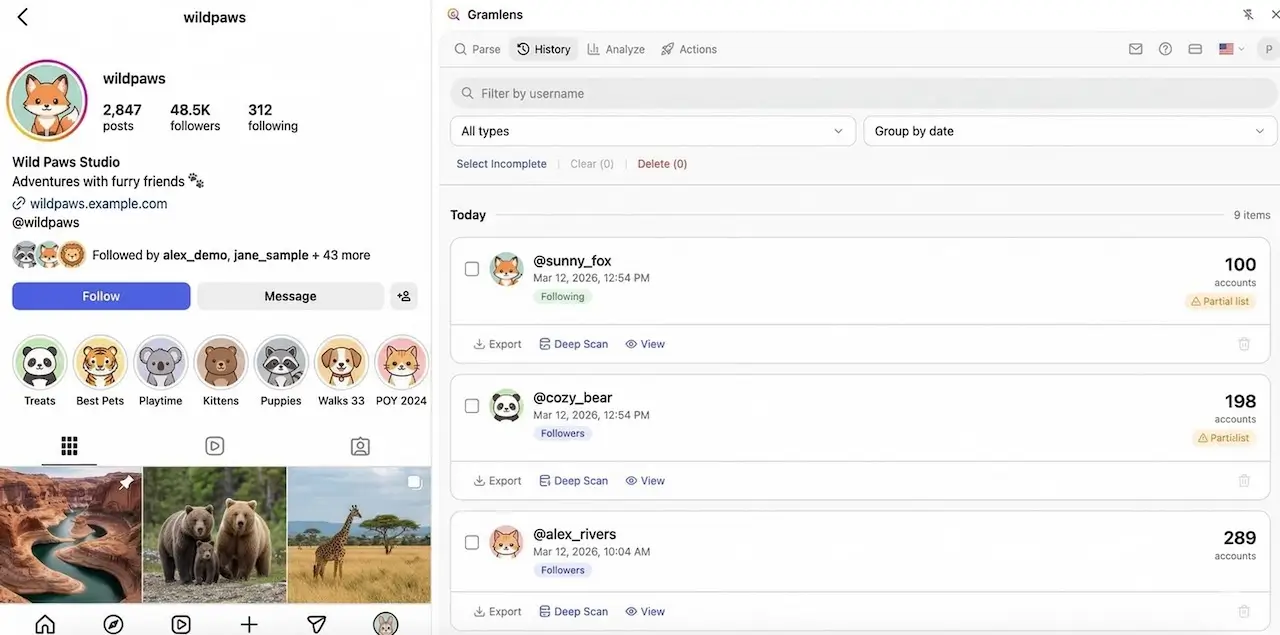
Open the Following tab on your own profile and Instagram hands you a sort menu: default, date followed (latest), date followed (earliest). Open the same tab on anyone else's profile and the menu is gone. What's left is the Instagram following list order, which Instagram has never explained and which a whole folklore has grown up around: the top of someone's list shows who they talk to most, or who they followed last, or who they secretly like. Most of that is wrong, and the part that's right is less useful than it looks.
This guide covers what the order actually reflects, on your own profile and on everyone else's; how to see who you followed recently; the one honest way to see who a public account followed recently; and why a partner's list won't tell you what you're hoping it will. We build a tool that does part of this, so read the middle section with that in mind.
How Instagram orders your own following list
Your own list is the only one Instagram lets you sort, and it gives you three views:
- Default. Instagram's own ranking. It isn't documented, but it behaves like an interaction score: accounts whose posts you open, like, reply to, or message tend to sit near the top, and accounts you followed years ago and never touched drift to the bottom.
- Date followed: Latest. Newest follows first. This is the real answer to "who did I recently follow" and it needs no tool at all.
- Date followed: Earliest. The reverse: the accounts you've followed the longest.
In the app, open your profile, tap Following, and tap the sort control at the top of the list; the Following dialog on instagram.com carries the same sort options. The app also offers two curated groups above the list, Least interacted with and Most shown in feed, which exist to help you prune, not to reveal anything about anyone else.
Hold on to one detail from this section, because it's where the confusion starts: the default view of your own list is ranked by your interactions. People see that on their own profile, then assume that the list they see on someone else's profile is ranked by that person's interactions. It isn't.
What the Instagram following list order means on someone else's profile
On another account's profile there is no sort menu and no date view. What you get is a ranking Instagram computes on the fly, and while Meta has never published the rules, a few things about it are easy to observe:
- It isn't chronological. Accounts followed last week can sit at the bottom; accounts followed in 2018 can sit at the top.
- It depends on who's looking. Open the same profile's following list from two different accounts and you'll usually get two different orders. That alone rules out any reading of the order as a fact about the profile owner.
- Your own connections float up. Accounts you also follow, accounts you interact with, and accounts Instagram considers relevant to you tend to appear near the top of everyone's list.
Put together, the order of someone else's following list says more about the relationship between you and the accounts on it than about the person whose list it is. The account at the top is there, more often than not, because you follow it too.
The three myths, in one place
- "The top of the list is who they interact with most." That's roughly true of the default view of your own list. It's not what you see on someone else's profile, where the ranking is built around the viewer.
- "The top of the list is who they followed most recently." Older versions of the list on the web ran close to reverse-chronological, which is where this belief comes from. It hasn't been reliable for years, and today the order is ranked and viewer-dependent.
- "An app can decode the order." No app can read a ranking that Instagram computes at request time and never exposes. What the "following order checker" apps actually do is take copies of a list at different times and compare them, which is the method described below, and some of them only see part of the activity.
How to see who you recently followed
For your own account this is a solved problem: open your profile, tap Following, and switch the sort to Date followed: Latest. The newest follows are at the top, with no third-party tool involved.
If you need the same thing as a file, because you're auditing who you follow, cleaning up before the 7,500-account cap, or keeping a backup before a big unfollow session, export the list instead. The walkthrough is in how to export your Instagram following list.
One honest caveat about that file: Instagram doesn't expose the follow date to anything but its own sort control, so the export keeps the list in the order Instagram served it and has no date column. If the date matters to you, sort in the app first, or keep dated exports and compare them, which brings us to the next section.
How to see who someone recently followed on Instagram (public accounts, the honest way)
There is exactly one reliable way to know what changed in a following list you can't sort: save a copy of the list, save another copy later, and compare the two. Every tool that claims to show "recent follows" for other accounts is doing some version of this, whether it says so or not. The difference is where the copies live and how complete they are.
The Gramlens Chrome extension does this inside your own browser, from the Instagram session you already have open, and stores the copies on your device. It reads the same lists Instagram already shows you, so it works on any public profile and on private profiles only if you follow them. You'll need a free Gramlens account to sign in, and the Instagram tab has to stay open while a list is being read. Here's the routine.
1. Save the following list once
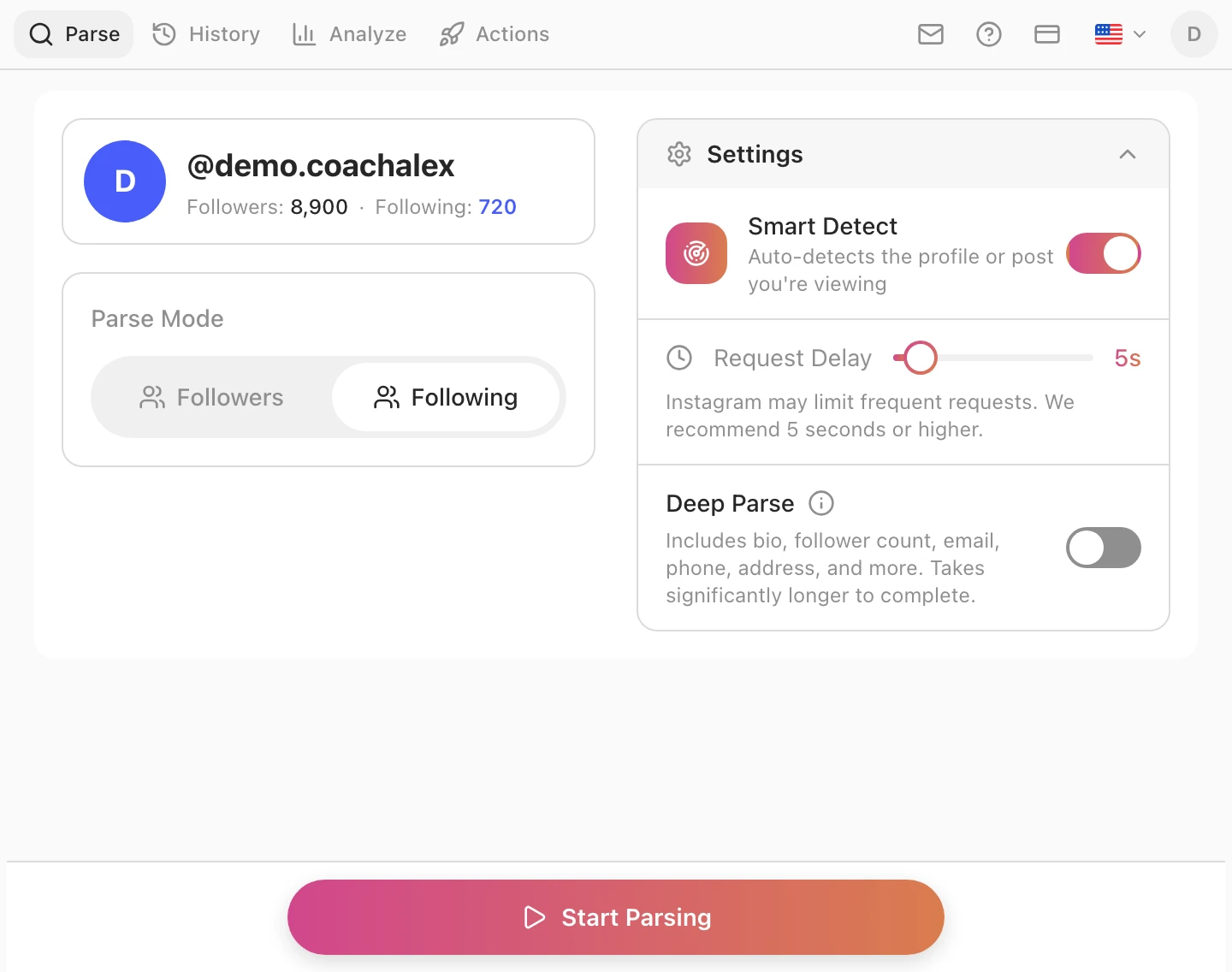
Open the profile on instagram.com and click the Gramlens icon. The side panel detects the profile, shows its follower and following counts, and offers a Parse Mode switch. Set it to Following and press Start Parsing. A list of a few hundred accounts takes a minute or two; keep the tab open while it runs.
2. Save it again later
Every finished run is stored in the History tab as a dated snapshot with its list type and account count. Come back in a few days, or a few weeks, and run the same parse again. That's the second copy. There is no background job here: a snapshot exists only when you run a parse, so the "when" of a change is only ever as precise as your own cadence.
3. Open the account's Timeline
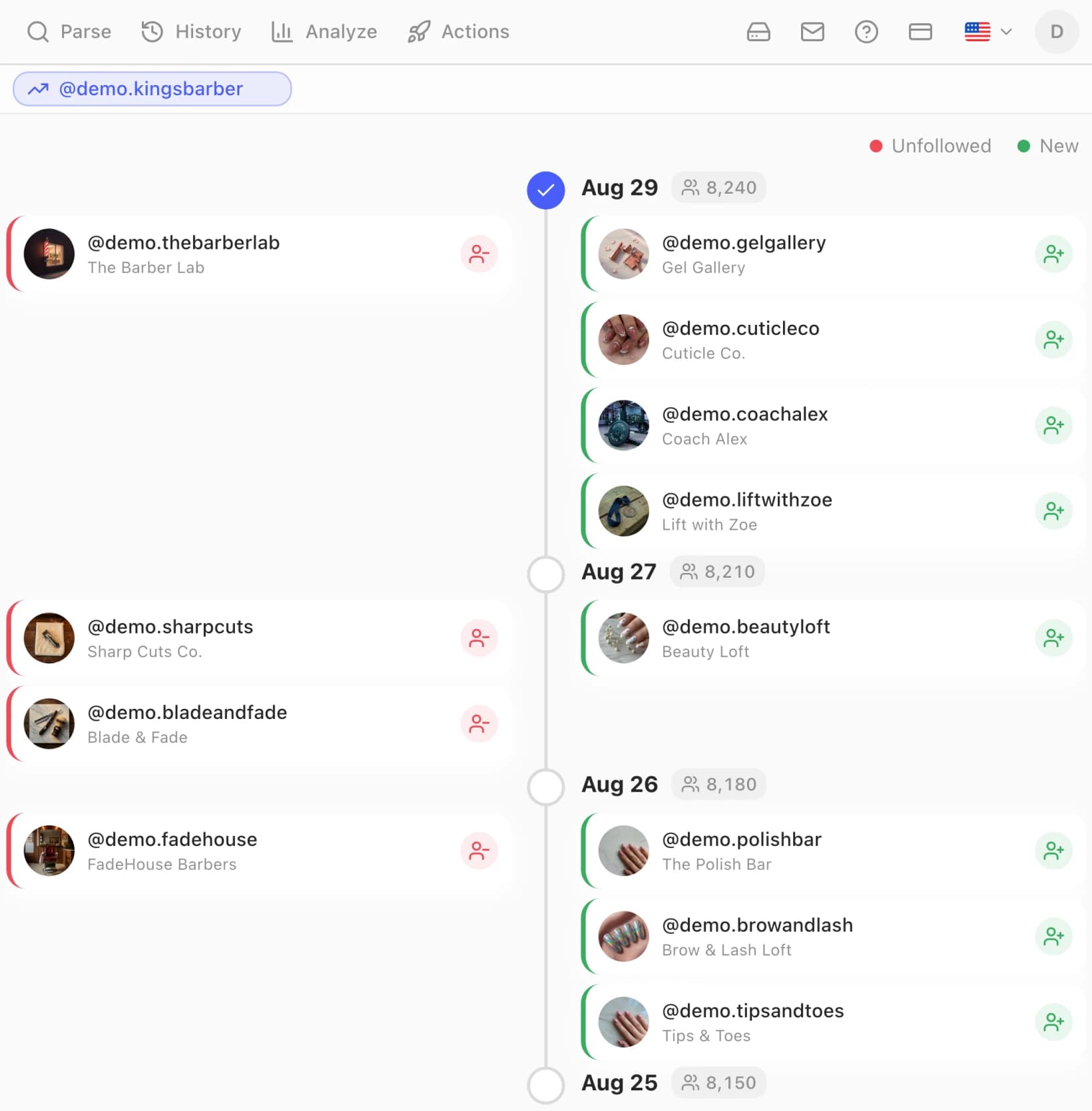
Open the Analyze tab and find the account's card. Open Timeline and choose Following: if the account also has follower snapshots, a small menu asks which list you mean; with only Following snapshots it's a single click. Timeline lines up the Following snapshots by date and diffs each date against the previous one. Two runs on the same day count as one, so the diff is between days, never finer. It's the same view that tracks who unfollowed you, pointed at a following list instead.
4. Read the result
Each date shows two columns: New in green on the right, the accounts the profile followed since the previous snapshot, and Unfollowed in red on the left, the accounts it stopped following. Click a card to open the profile. That green column is the only real "recently followed" list there is for an account you don't own, and it's exactly as complete as the snapshots that produced it.
What you don't get, so that nobody is surprised later:
- No exact dates. Instagram never exposes when a follow happened. Timeline tells you a follow occurred between one snapshot and the next, and nothing finer.
- Nothing before your first snapshot. Tracking starts when you take the baseline. A tool that claims to show you what someone followed last month, with no history of its own, is guessing.
- Public accounts only. A private account you don't follow shows nothing, in Gramlens or anywhere else. The extension never bypasses privacy settings.
- Free plan limits. Free covers 500 records per parse and 50 Analyze views a month, and its Analyze tab lists only accounts parsed in the last seven days. Snapshots themselves are never deleted, so an older baseline is still compared the moment you parse the account again. Plus removes the caps and the seven-day window.
Where this is genuinely useful: a brand that wants to notice when a competitor or a potential partner starts following a new set of creators (the account comparison guide covers the audience side of that), a team that shares one brand account and wants a dated record of which accounts it followed between one snapshot and the next, or simply your own account, where Timeline doubles as a follow history.
Why a partner's following list won't tell you what you want to know
We'd be pretending not to know why many people search for this. A large share of the searches that lead here are "who did he recently follow" and "who is she following now", and it would be dishonest to write a guide about following lists without addressing that directly.
Three things are worth knowing before you compare anyone's snapshots.
The list doesn't say what you think it says. A follow is a tap. A week of "new following" on a normal account contains a colleague, two meme pages, a restaurant, a brand running a giveaway, and three people the algorithm suggested after one liked post. Reading a pattern into that requires a story you brought with you, and the list will confirm whatever story that was.
Checking doesn't settle the feeling. A two-year study of 322 young adults published in the Journal of Marital and Family Therapy in 2025 found that jealousy triggered by social media predicted more electronic monitoring of a partner and lower relationship satisfaction a year later. What predicted the lower satisfaction was the jealousy; the monitoring was what it turned into. A 2023 study in Communication Quarterly on electronic surveillance in couples points the same way: the people most inclined to check, the anxious and the jealous, are the ones for whom checking goes with the worst outcomes, and low trust makes it worse.
Keeping tabs on one person over time is monitoring, and we don't build for it. Reading a public list once is something Instagram lets anyone do. Keeping dated copies of an individual's list to build a case against them, especially someone who doesn't know, is what our Acceptable Use Policy prohibits in plain words: using Gramlens to harass, stalk, intimidate, or monitor individuals without their consent. The Timeline view above exists for your own account and for public-audience research. It is not a relationship tool, and a guide that pitched it as one would be selling you something that doesn't work.
If you've reached the point of wanting to check, the question is already about trust, and no list can answer that one. A conversation can, and it costs nothing.
What "recent follow tracker" apps actually do
Search for "see who someone recently followed" and you'll find a row of apps and websites promising exactly that, anonymously, for any username. Knowing how the following list works, you can already see what they must be doing: reading public lists from their own servers on a schedule and comparing the copies, the same two-snapshot method as above. Three things follow from that.
- Coverage is only as good as their schedule. A follow that happens and is undone between two of their reads never existed as far as the report is concerned. Some of the best-known trackers say openly that a report contains only part of a public account's activity, and the number is not close to 100 percent.
- "Real-time" means "recently polled." The list order can't be read chronologically, so any timestamp they show is the time of their snapshot, not the time of the follow.
- The login-based ones are a different risk entirely. Any tracker that asks for your Instagram password to show you someone else's follows is asking for full control of your account to do a job that needs none of it. Are Instagram follower tracker apps safe? has a five-minute audit for that category, and it applies to us too.
If you only need the answer for your own account, none of this applies: Instagram's own date sort is faster, more accurate, and free.
Frequently asked questions
Is the Instagram following list in chronological order?
Only if you choose that view on your own profile: Instagram offers Date followed: Latest and Earliest for the list of accounts you follow. On anyone else's profile the list is ranked by Instagram for the person viewing it, and the order is neither chronological nor the same for every viewer.
Can you see the date someone followed an account?
No. Instagram doesn't expose follow dates for other accounts, in the app, on the web, or to any third-party tool. The closest you can get is a window: compare two dated copies of the list and you know a follow happened between them.
How do I see who I recently followed on Instagram?
Open your profile, tap Following, and switch the sort to Date followed: Latest. If you want it as a file, export your following list; the file keeps Instagram's order but carries no date column.
Can I see who someone recently followed on Instagram?
For a public account, yes, by comparing two snapshots of its following list taken at different times. Gramlens does this in your browser: parse the account's Following list, parse it again later, and the Timeline view lists the accounts added and removed between the two dates. There is no exact date and nothing from before your first snapshot.
Does Instagram notify someone when you look at their following list?
No. Instagram doesn't send notifications for profile visits or for viewing follower and following lists, and exporting a public list from your own session sends none either. That is a fact about Instagram, not permission to monitor people; see the section on partners above.
Does this work on private accounts?
Only if you already follow the account, in which case Instagram shows you the list anyway. A private account you don't follow returns nothing, and no legitimate tool can change that.
Why does someone's following list look different on my phone and my friend's?
Because the order is computed for the viewer. Instagram ranks the list using your own connections and activity, so two people see two orders. That's also why the order can't tell you anything reliable about the account owner.
Is there a Chrome extension that shows the Instagram following order?
No extension can change how Instagram ranks someone else's list or reveal follow dates that Instagram doesn't expose. What an extension like Gramlens can do is export a following list as it's served and diff dated snapshots of it in Timeline, which is the only honest "recent follows" view for an account you don't own.
Nothing here is legal or relationship advice. Instagram's ranking of following lists is undocumented and can change without notice. Gramlens is not affiliated with Instagram or Meta.
TL;DR. Your own following list can be sorted by date in the app; everyone else's is ranked for you, the viewer, and its order says nothing reliable about the account owner. To see who a public account followed recently, take two dated copies of its following list and let Timeline diff them, which Gramlens does in your browser with no password and no background job. It works for your own account and for public-audience research; it isn't built for keeping tabs on a person, and the reasons for that are in the section above.
Keep reading
Explore the feature